Face Image Quality Assessment
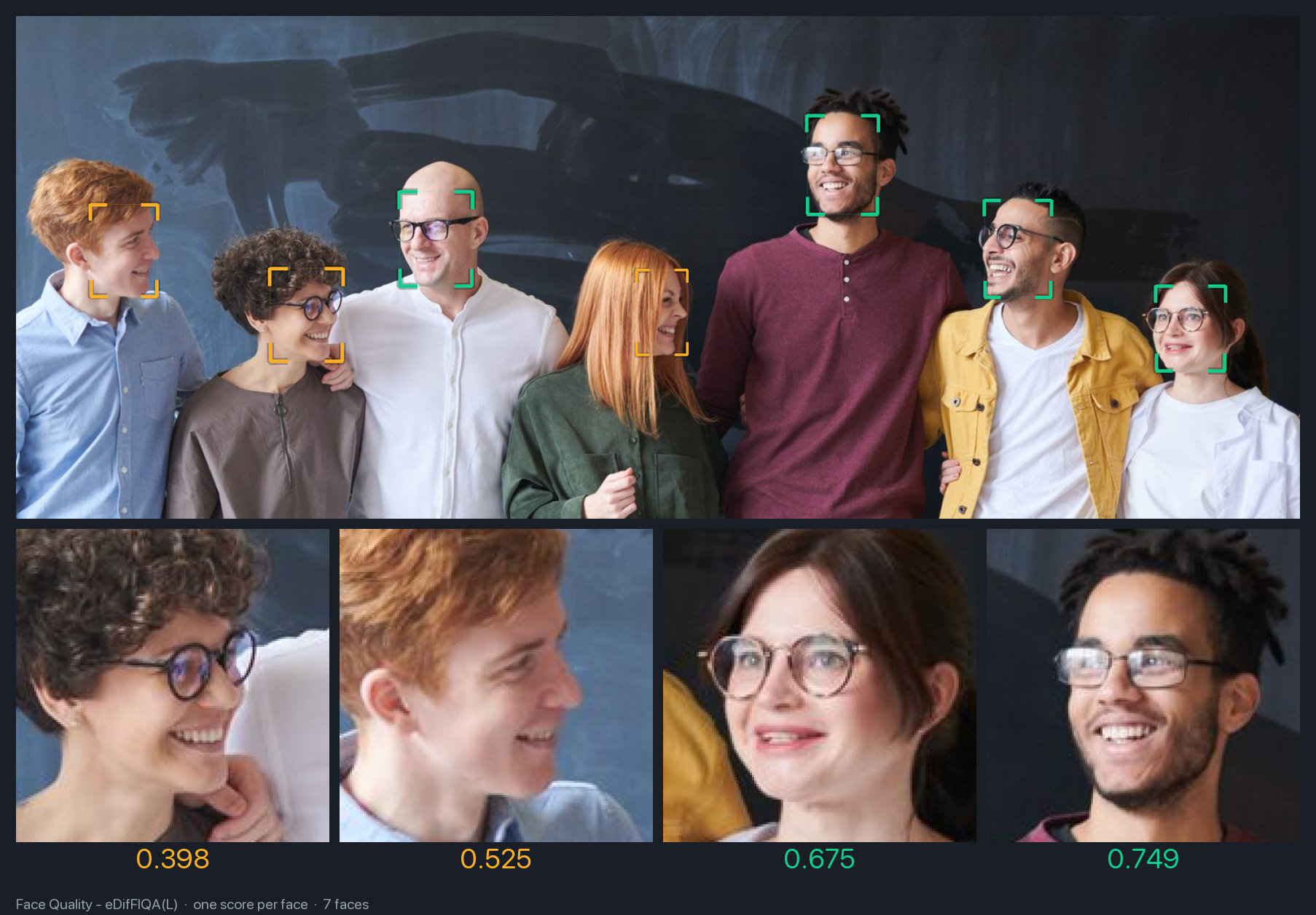
Face image quality assessment predicts a single scalar score from an aligned face crop. Higher score = better quality (sharpness, frontalness, illumination, low occlusion). Use the score to filter or rank faces before recognition.
UniFace ships eDifFIQA, which ranks first on the NIST FATE-Quality Kiosk-to-Entry track with the L variant.
Available Models
| Variant | Backbone | Params | Size |
|---|---|---|---|
| eDifFIQA-T | MobileFaceNet | 1.7M | 6.6 MB |
| eDifFIQA-S | IResNet-18 | 24.6M | 93.7 MB |
| eDifFIQA-M | IResNet-50 | 44.1M | 168.3 MB |
| eDifFIQA-L | IResNet-100 | 65.7M | 250.6 MB |
All variants take an aligned 112x112 face crop and output a scalar score in roughly [0, 1].
Basic Usage
import cv2
from uniface.detection import SCRFD
from uniface.quality import EDifFIQA

# Lower SCRFD's confidence threshold so quality scoring sees every plausible
# face — including the low-confidence ones that quality scoring is meant to flag.
detector = SCRFD(confidence_threshold=0.3)
quality = EDifFIQA()

image = cv2.imread("photo.jpg")
faces = detector.detect(image)

for face in faces:
    result = quality.predict(image, face.landmarks)
    print(f"Quality: {result.score:.4f}")
predict aligns the face using the 5-point landmarks and runs inference. To skip alignment (pre-aligned 112x112 crop), call score_aligned instead:
Detector threshold
SCRFD's default confidence_threshold is 0.5, which can miss tightly-cropped or partial faces — exactly the cases you want quality scoring to surface. Drop it to ~0.3 for quality use cases.
Output Format
result = quality.predict(image, face.landmarks)

# QualityResult dataclass
result.score   # float, higher = better
Scores are roughly in [0, 1] but eDifFIQA is not a calibrated probability — the absolute number is only meaningful relative to other faces from the same model. As a rough guide from the upstream demo (eDifFIQA-T):
| Score | Typical face |
|---|---|
| ≥ 0.7 | Sharp, frontal, well-lit |
| 0.4 – 0.7 | Acceptable (some blur / off-angle / low-res) |
| < 0.3 | Heavy blur, occlusion, or severe degradation |
Calibrate your own threshold on a held-out set rather than reusing these bands verbatim.
Model Variants
from uniface.quality import EDifFIQA
from uniface.constants import EDifFIQAWeights

# Default (T, smallest, recommended for real-time)
quality = EDifFIQA()

# More accurate variants
quality = EDifFIQA(model_name=EDifFIQAWeights.S)
quality = EDifFIQA(model_name=EDifFIQAWeights.M)
quality = EDifFIQA(model_name=EDifFIQAWeights.L)
Visualization
from uniface.draw import draw_quality_score

for face in faces:
    result = quality.predict(image, face.landmarks)
    draw_quality_score(image, face.bbox, result.score)

cv2.imwrite("quality_output.jpg", image)
The label is color-coded by score: red (< 0.3), orange (0.3-0.6), green (>= 0.6). Adjust with low_threshold and high_threshold kwargs.
Use Cases
Filter Low-Quality Faces Before Recognition
from uniface.detection import SCRFD
from uniface.quality import EDifFIQA
from uniface.recognition import ArcFace

detector = SCRFD(confidence_threshold=0.3)
quality = EDifFIQA()
recognizer = ArcFace()

MIN_QUALITY = 0.5  # tune on your data

for face in detector.detect(image):
    score = quality.predict(image, face.landmarks).score
    if score < MIN_QUALITY:
        continue
    face.embedding = recognizer.get_normalized_embedding(image, face.landmarks)
Rank Faces in a Video
best = (None, -1.0)  # (frame_idx, score)

for idx, frame in enumerate(frames):
    for face in detector.detect(frame):
        score = quality.predict(frame, face.landmarks).score
        if score > best[1]:
            best = (idx, score)

print(f"Best frame: {best[0]} (quality {best[1]:.4f})")
Best-of-N Enrollment
Pick the sharpest frame from a short capture for face enrollment:
def best_face_from_capture(frames, detector, quality):
    """Return the (frame, face) with the highest quality across frames."""
    best = (None, None, -1.0)
    for frame in frames:
        for face in detector.detect(frame):
            score = quality.predict(frame, face.landmarks).score
            if score > best[2]:
                best = (frame, face, score)
    return best  # (frame, face, score)
Real-Time Webcam
import cv2
from uniface.detection import SCRFD
from uniface.quality import EDifFIQA
from uniface.draw import draw_quality_score

detector = SCRFD(confidence_threshold=0.3)
quality = EDifFIQA()

cap = cv2.VideoCapture(0)
while True:
    ret, frame = cap.read()
    if not ret:
        break

    for face in detector.detect(frame):
        result = quality.predict(frame, face.landmarks)
        draw_quality_score(frame, face.bbox, result.score)

    cv2.imshow("Face Quality", frame)
    if cv2.waitKey(1) & 0xFF == ord('q'):
        break

cap.release()
cv2.destroyAllWindows()
Reference
- Paper: "eDifFIQA: Towards Efficient Face Image Quality Assessment based on Denoising Diffusion Probabilistic Models" (Babnik et al., IEEE T-BIOM 2024)
- Code: yakhyo/face-image-quality-assessment — PyTorch inference, ONNX export, and ONNX Runtime inference. ONNX weights for UniFace are mirrored here.
Next Steps
- Recognition - Run recognition only on high-quality faces
- Anti-Spoofing - Liveness check
- Detection - Face detection
- CLI Tools - Command-line scripts for all UniFace modules