Gaze Estimation
Gaze estimation predicts where a person is looking (pitch and yaw angles).
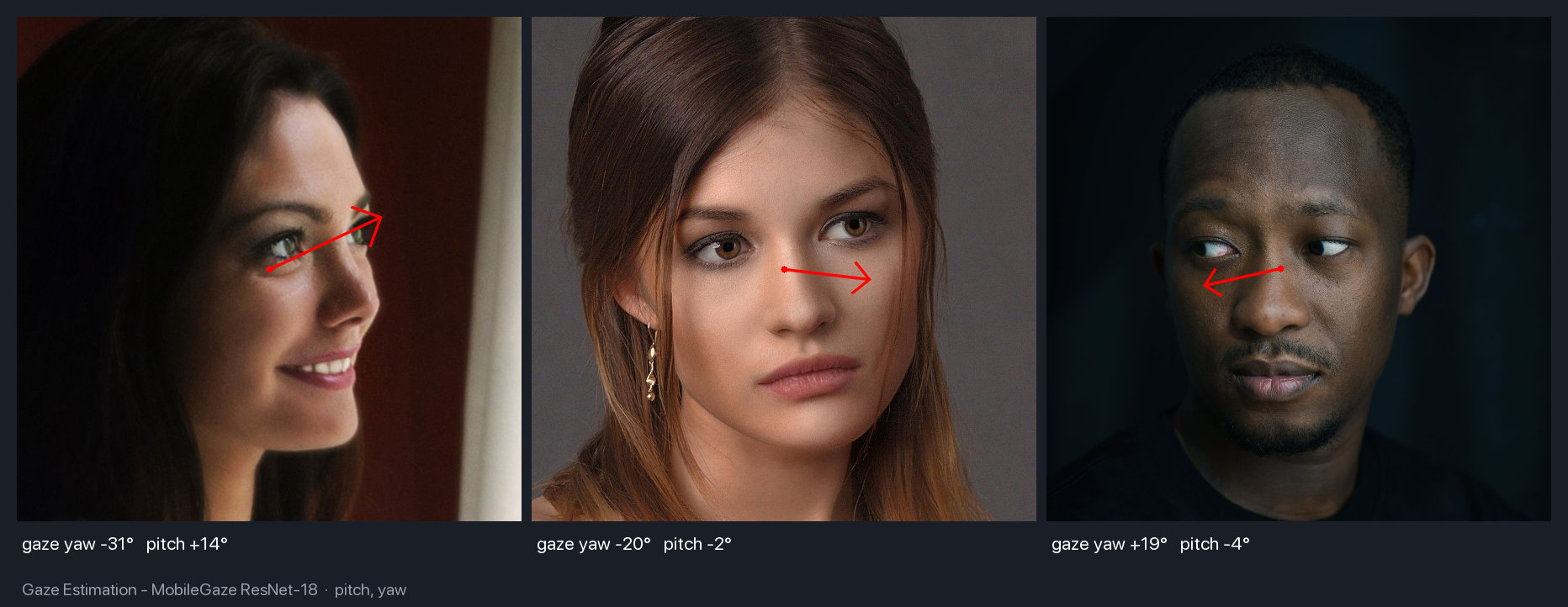
Available Models
| Model | Backbone | Size | MAE* |
|---|---|---|---|
| ResNet18 | ResNet18 | 43 MB | 12.84° |
| ResNet34 | ResNet34 | 82 MB | 11.33° |
| ResNet50 | ResNet50 | 91 MB | 11.34° |
| MobileNetV2 | MobileNetV2 | 9.6 MB | 13.07° |
| MobileOne-S0 | MobileOne | 4.8 MB | 12.58° |
*MAE = Mean Absolute Error on Gaze360 test set (lower is better)
The default is ResNet-34
MobileGaze() loads ResNet-34. On three subjects looking left, part-left and right,
ResNet-18 was the only backbone that returned a positive yaw on the third face; the others
read all three as leftward. Backbone choice changes the sign, not just the error, so test
yours on faces like your own.
Basic Usage
import cv2
import numpy as np
from uniface.detection import RetinaFace
from uniface.gaze import MobileGaze

detector = RetinaFace()
gaze_estimator = MobileGaze()

image = cv2.imread("photo.jpg")
faces = detector.detect(image)

for face in faces:
    # Crop face
    x1, y1, x2, y2 = map(int, face.bbox)
    face_crop = image[y1:y2, x1:x2]

    if face_crop.size > 0:
        # Estimate gaze
        result = gaze_estimator.estimate(face_crop)

        # Convert to degrees
        pitch_deg = np.degrees(result.pitch)
        yaw_deg = np.degrees(result.yaw)

        print(f"Pitch: {pitch_deg:.1f}°, Yaw: {yaw_deg:.1f}°")
Model Variants
from uniface.gaze import MobileGaze
from uniface.constants import GazeWeights

# Default (ResNet34, recommended)
gaze = MobileGaze()

# Lightweight for mobile/edge
gaze = MobileGaze(model_name=GazeWeights.MOBILEONE_S0)

# Higher accuracy
gaze = MobileGaze(model_name=GazeWeights.RESNET50)
Output Format
result = gaze_estimator.estimate(face_crop)

# GazeResult dataclass
result.pitch  # Vertical angle in radians
result.yaw    # Horizontal angle in radians
Angle Convention
          pitch = +90° (looking up)
               │
               │
yaw = -90° ────┼──── yaw = +90°
(looking left) │     (looking right)
               │
          pitch = -90° (looking down)
- Pitch: Vertical gaze angle
- Positive = looking up
-
Negative = looking down
-
Yaw: Horizontal gaze angle
- Positive = looking right
- Negative = looking left
Visualization
from uniface.draw import draw_gaze

# Detect faces
faces = detector.detect(image)

for face in faces:
    x1, y1, x2, y2 = map(int, face.bbox)
    face_crop = image[y1:y2, x1:x2]

    if face_crop.size > 0:
        result = gaze_estimator.estimate(face_crop)

        # Draw gaze arrow on image
        draw_gaze(image, face.bbox, result.pitch, result.yaw)

cv2.imwrite("gaze_output.jpg", image)
Custom Visualization
import cv2
import numpy as np

def draw_gaze_custom(image, bbox, pitch, yaw, length=100, color=(0, 255, 0)):
    """Draw custom gaze arrow."""
    x1, y1, x2, y2 = map(int, bbox)

    # Face center
    cx = (x1 + x2) // 2
    cy = (y1 + y2) // 2

    # Calculate endpoint
    dx = -length * np.sin(yaw) * np.cos(pitch)
    dy = -length * np.sin(pitch)

    # Draw arrow
    end_x = int(cx + dx)
    end_y = int(cy + dy)

    cv2.arrowedLine(image, (cx, cy), (end_x, end_y), color, 2, tipLength=0.3)

    return image
Real-Time Gaze Tracking
import cv2
import numpy as np
from uniface.detection import RetinaFace
from uniface.gaze import MobileGaze
from uniface.draw import draw_gaze

detector = RetinaFace()
gaze_estimator = MobileGaze()

cap = cv2.VideoCapture(0)

while True:
    ret, frame = cap.read()
    if not ret:
        break

    faces = detector.detect(frame)

    for face in faces:
        x1, y1, x2, y2 = map(int, face.bbox)
        face_crop = frame[y1:y2, x1:x2]

        if face_crop.size > 0:
            result = gaze_estimator.estimate(face_crop)

            # Draw bounding box
            cv2.rectangle(frame, (x1, y1), (x2, y2), (0, 255, 0), 2)

            # Draw gaze
            draw_gaze(frame, face.bbox, result.pitch, result.yaw)

            # Display angles
            pitch_deg = np.degrees(result.pitch)
            yaw_deg = np.degrees(result.yaw)
            label = f"P:{pitch_deg:.0f} Y:{yaw_deg:.0f}"
            cv2.putText(frame, label, (x1, y1 - 10),
                       cv2.FONT_HERSHEY_SIMPLEX, 0.5, (0, 255, 0), 2)

    cv2.imshow("Gaze Estimation", frame)

    if cv2.waitKey(1) & 0xFF == ord('q'):
        break

cap.release()
cv2.destroyAllWindows()
Use Cases
Attention Detection
def is_looking_at_camera(result, threshold=15):
    """Check if person is looking at camera."""
    pitch_deg = abs(np.degrees(result.pitch))
    yaw_deg = abs(np.degrees(result.yaw))

    return pitch_deg < threshold and yaw_deg < threshold

# Usage
result = gaze_estimator.estimate(face_crop)
if is_looking_at_camera(result):
    print("Looking at camera")
else:
    print("Looking away")
Gaze Direction Classification
def classify_gaze_direction(result, threshold=20):
    """Classify gaze into directions."""
    pitch_deg = np.degrees(result.pitch)
    yaw_deg = np.degrees(result.yaw)

    directions = []

    if pitch_deg > threshold:
        directions.append("up")
    elif pitch_deg < -threshold:
        directions.append("down")

    if yaw_deg > threshold:
        directions.append("right")
    elif yaw_deg < -threshold:
        directions.append("left")

    if not directions:
        return "center"

    return " ".join(directions)

# Usage
result = gaze_estimator.estimate(face_crop)
direction = classify_gaze_direction(result)
print(f"Looking: {direction}")
Available Estimators
Next Steps
- Head Pose Estimation - 3D head orientation
- Anti-Spoofing - Face liveness detection
- Privacy - Face anonymization
- Video Recipe - Real-time processing
- CLI Tools - Command-line scripts for all UniFace modules