Attributes
Facial attribute analysis for age, gender, race, emotion, and face state detection (eye openness, glasses, mask).
Available Models
| Model | Attributes | Size | Notes |
|---|---|---|---|
| AgeGender | Age, Gender | 8 MB | Exact age prediction |
| FairFace | Gender, Age Group, Race | 44 MB | Balanced demographics |
| Emotion | 7-8 emotions | 2 MB | Requires PyTorch |
| FaceAttribNet | Eye openness, Eyeglasses, Mask, Sunglasses | 41 MB | Multi-label (independent probabilities) |
AgeGender
Predicts exact age and binary gender.
Basic Usage
from uniface.attribute import AgeGender
from uniface.detection import RetinaFace

detector = RetinaFace()
age_gender = AgeGender()

faces = detector.detect(image)

for face in faces:
    result = age_gender.predict(image, face)
    print(f"Gender: {result.sex}")  # "Female" or "Male"
    print(f"Age: {result.age} years")
    # face.gender and face.age are also set automatically
Output
# DemographyResult fields
result.gender     # 0=Female, 1=Male
result.sex        # "Female" or "Male" (property)
result.age        # int, age in years
result.age_group  # None (not provided by this model)
result.race       # None (not provided by this model)
FairFace
Predicts gender, age group, and race with balanced demographics.
Basic Usage
from uniface.attribute import FairFace
from uniface.detection import RetinaFace

detector = RetinaFace()
fairface = FairFace()

faces = detector.detect(image)

for face in faces:
    result = fairface.predict(image, face)
    print(f"Gender: {result.sex}")
    print(f"Age Group: {result.age_group}")
    print(f"Race: {result.race}")
    # face.gender, face.age_group, face.race are also set automatically
Output
# DemographyResult fields
result.gender     # 0=Female, 1=Male
result.sex        # "Female" or "Male"
result.age        # None (not provided by this model)
result.age_group  # "20-29", "30-39", etc.
result.race       # Race/ethnicity label
Race Categories
| Label |
|---|
| White |
| Black |
| Latino Hispanic |
| East Asian |
| Southeast Asian |
| Indian |
| Middle Eastern |
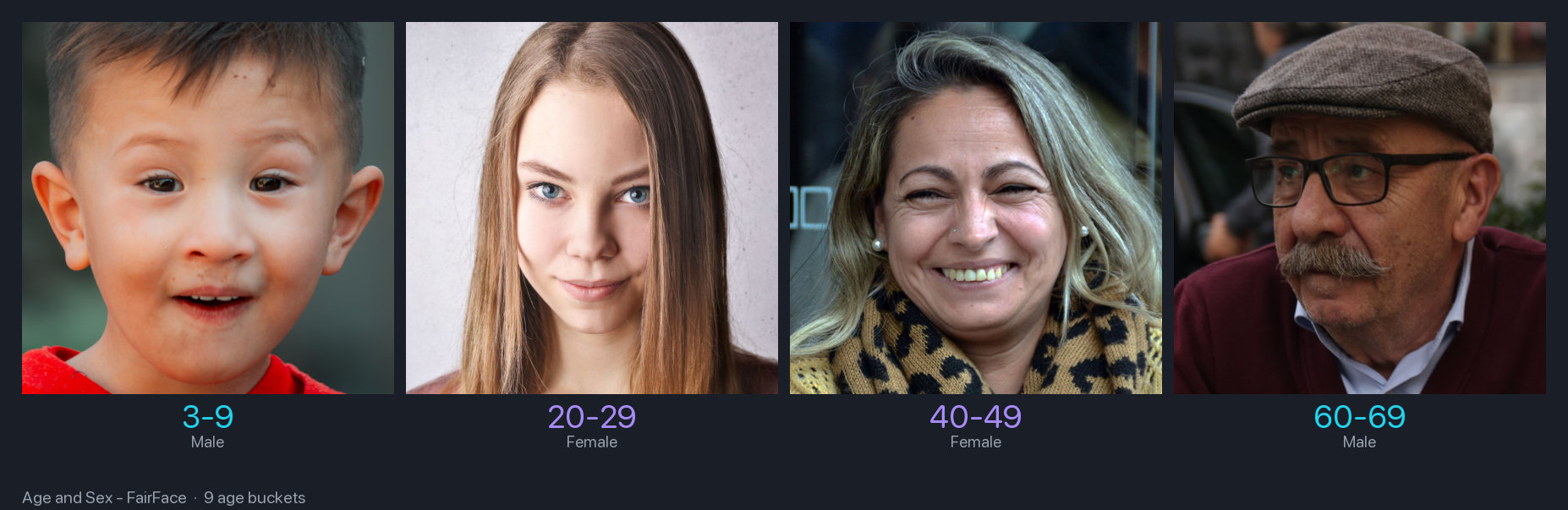
FairFace orders ages more reliably than AgeGender
On four subjects spanning child to elderly, AgeGender put the child at 30 and returned Male
for the elderly woman. FairFace's buckets ordered correctly on the same photographs. Prefer
FairFace when the relative order matters more than an exact number.
Age Groups
| Group |
|---|
| 0-2 |
| 3-9 |
| 10-19 |
| 20-29 |
| 30-39 |
| 40-49 |
| 50-59 |
| 60-69 |
| 70+ |
Emotion
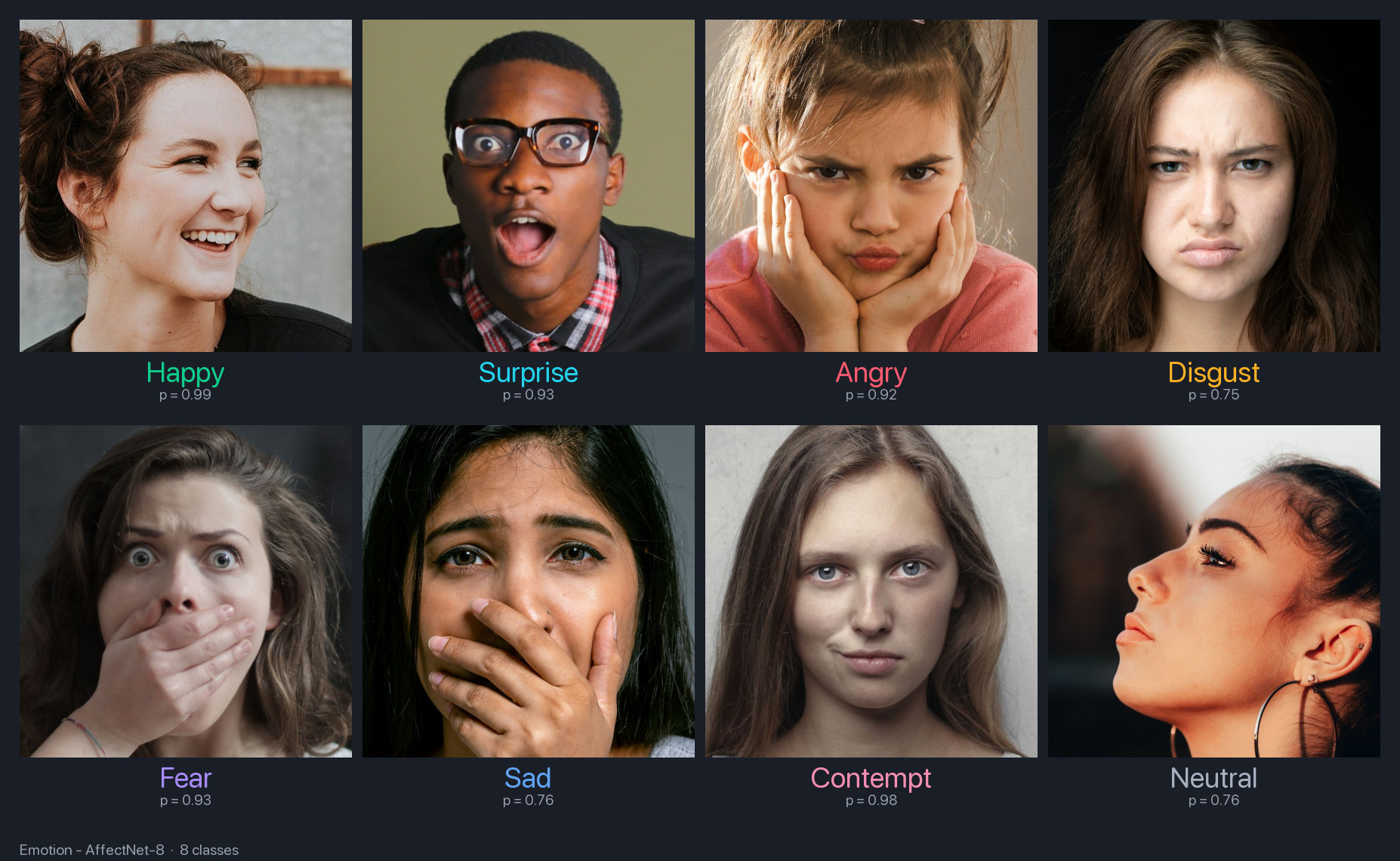
Predicts facial emotions. Requires PyTorch.
Basic Usage
from uniface.detection import RetinaFace
from uniface.attribute import Emotion
from uniface.constants import EmotionWeights

detector = RetinaFace()
emotion = Emotion(model_name=EmotionWeights.AFFECNET7)

faces = detector.detect(image)

for face in faces:
    result = emotion.predict(image, face)
    print(f"Emotion: {result.emotion}")
    print(f"Confidence: {result.confidence:.2%}")
Emotion Classes
| Label |
|---|
| Neutral |
| Happy |
| Sad |
| Surprise |
| Fear |
| Disgust |
| Angry |
| Label |
|---|
| Neutral |
| Happy |
| Sad |
| Surprise |
| Fear |
| Disgust |
| Angry |
| Contempt |
Model Variants
from uniface.attribute import Emotion
from uniface.constants import EmotionWeights

# 7-class emotion
emotion = Emotion(model_name=EmotionWeights.AFFECNET7)

# 8-class emotion
emotion = Emotion(model_name=EmotionWeights.AFFECNET8)
FaceAttribNet
Predicts five independent binary face states from a face crop: left/right eye openness, eyeglasses, face mask, and sunglasses. Based on Qualcomm's Facial-Attribute-Detection model.
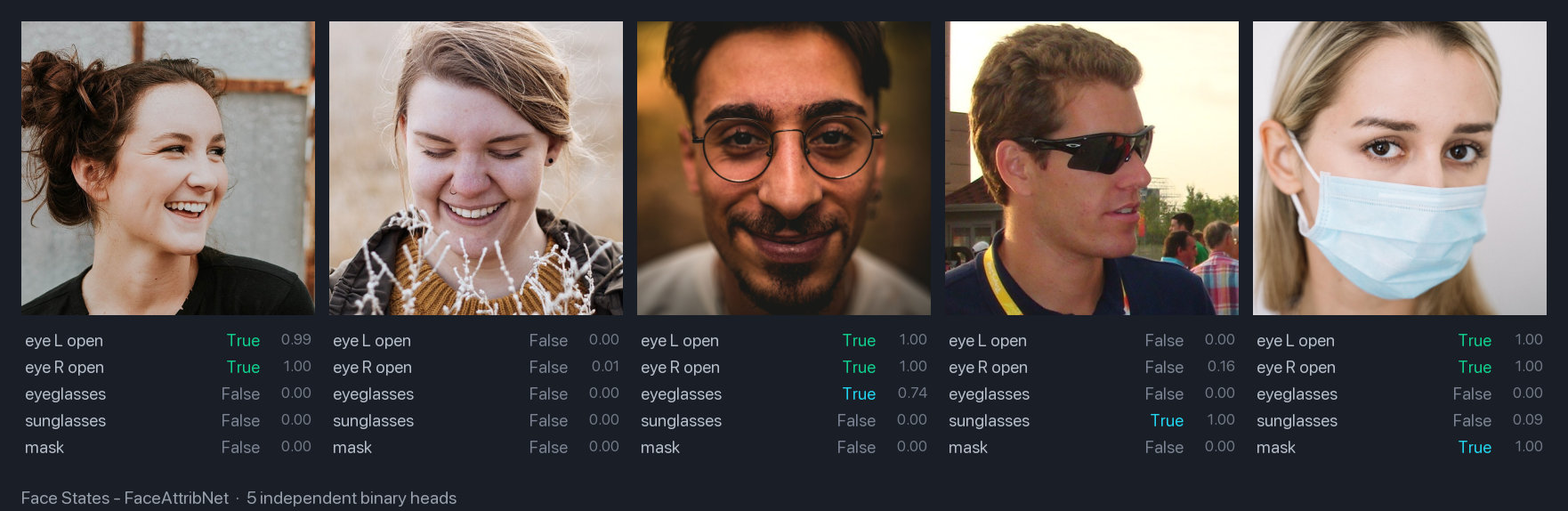
Multi-label output
The five values come from independent binary heads: they do not sum to 1 and
several can be high at once (a face can wear both sunglasses and a mask).
Threshold each attribute separately; never argmax.
Basic Usage
from uniface.attribute import FaceAttribNet
from uniface.detection import RetinaFace

detector = RetinaFace()
face_attrib = FaceAttribNet()

faces = detector.detect(image)

for face in faces:
    result = face_attrib.predict(image, face)
    print(result.as_dict())              # {'left_eye_open': 0.99, 'right_eye_open': 0.98, ...}
    print(result.labels(threshold=0.5))  # e.g. ['left_eye_open', 'right_eye_open', 'eyeglasses']
    # face.left_eye_open, face.right_eye_open, face.eyeglasses,
    # face.mask, face.sunglasses are also set automatically
Output
# FaceStateResult fields (all probabilities in [0, 1])
result.left_eye_open   # Probability the left eye is open
result.right_eye_open  # Probability the right eye is open
result.eyeglasses      # Probability eyeglasses are present
result.mask            # Probability a face mask is present
result.sunglasses      # Probability sunglasses are present

result.as_dict()            # name -> probability mapping
result.labels(threshold)    # names of attributes above the threshold
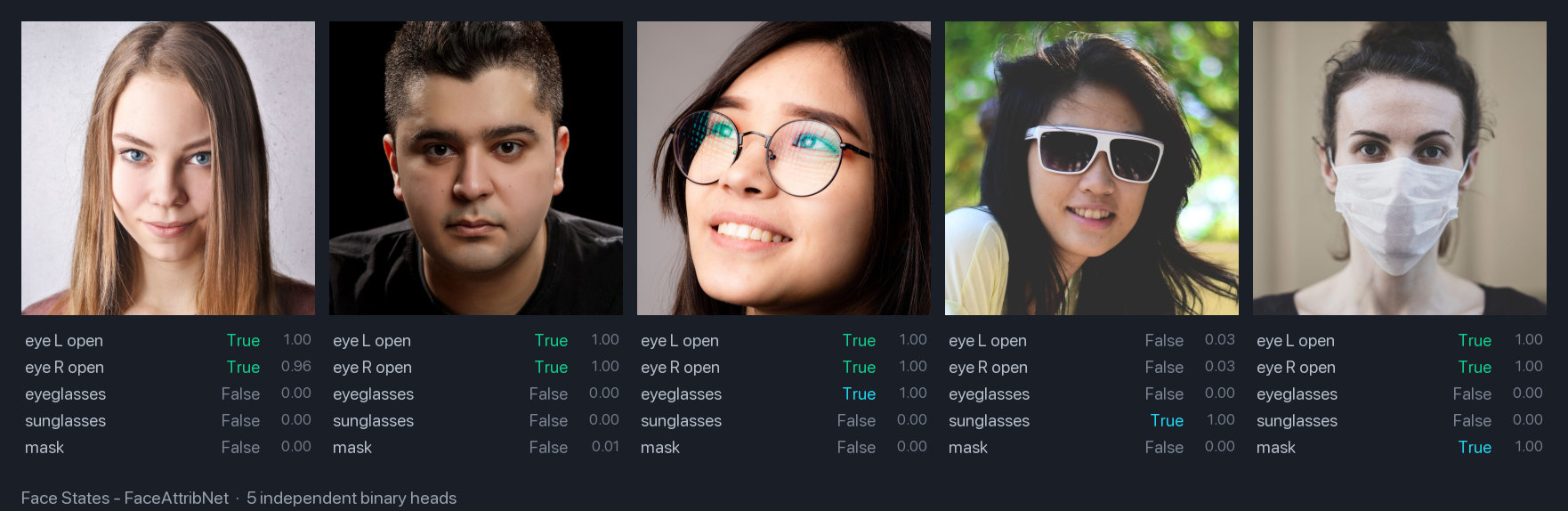
sunglasses True with both eyes False, because the lenses hide the eyesThe heads do not compete: nothing stops eyeglasses and mask from both clearing 0.5 on the
same face. Read each probability on its own rather than picking a single winning label.
Available Attribute Models
from uniface.attribute import AgeGender, Emotion, FaceAttribNet, FairFace

age_gender = AgeGender()
fairface = FairFace()
emotion = Emotion()  # requires the optional `torch` dependency
face_attrib = FaceAttribNet()
Combining Models
Full Attribute Analysis
from uniface.attribute import AgeGender, FairFace
from uniface.detection import RetinaFace

detector = RetinaFace()
age_gender = AgeGender()
fairface = FairFace()

faces = detector.detect(image)

for face in faces:
    # Get exact age from AgeGender
    ag_result = age_gender.predict(image, face)

    # Get race from FairFace
    ff_result = fairface.predict(image, face)

    print(f"Gender: {ag_result.sex}")
    print(f"Exact Age: {ag_result.age}")
    print(f"Age Group: {ff_result.age_group}")
    print(f"Race: {ff_result.race}")
Using FaceAnalyzer
from uniface.analyzer import FaceAnalyzer
from uniface.attribute import AgeGender
from uniface.detection import RetinaFace

analyzer = FaceAnalyzer(
    detector=RetinaFace(),
    predictors=[AgeGender()],
)

faces = analyzer.analyze(image)

for face in faces:
    print(f"Age: {face.age}, Gender: {face.sex}")
Visualization
import cv2

def draw_attributes(image, face, result):
    """Draw attributes on image."""
    x1, y1, x2, y2 = map(int, face.bbox)

    # Draw bounding box
    cv2.rectangle(image, (x1, y1), (x2, y2), (0, 255, 0), 2)

    # Build label
    label = f"{result.sex}"
    if result.age:
        label += f", {result.age}y"
    if result.age_group:
        label += f", {result.age_group}"
    if result.race:
        label += f", {result.race}"

    # Draw label
    cv2.putText(
        image, label, (x1, y1 - 10),
        cv2.FONT_HERSHEY_SIMPLEX, 0.5, (0, 255, 0), 2
    )

    return image

# Usage
for face in faces:
    result = age_gender.predict(image, face)
    image = draw_attributes(image, face, result)

cv2.imwrite("attributes.jpg", image)
Accuracy Notes
Model Limitations
- AgeGender: Trained on CelebA; accuracy varies by demographic
- FairFace: Trained for balanced demographics; better cross-racial accuracy
- Emotion: Accuracy depends on facial expression clarity
- FaceAttribNet: Trained by Qualcomm on a proprietary dataset; tinted eyeglasses may register as sunglasses
Always test on your specific use case and consider cultural context.
Next Steps
- Parsing - Face semantic segmentation
- Gaze - Gaze estimation
- Image Pipeline Recipe - Complete workflow
- CLI Tools - Command-line scripts for all UniFace modules