How to Choose a Face Recognition Model in UniFace
UniFace ships five face recognition families, and the docs will happily tell you the benchmark score of each one. What they cannot tell you is whether those scores mean anything for your photos, or whether the tiny 5 MB model is good enough to skip the 260 MB one.
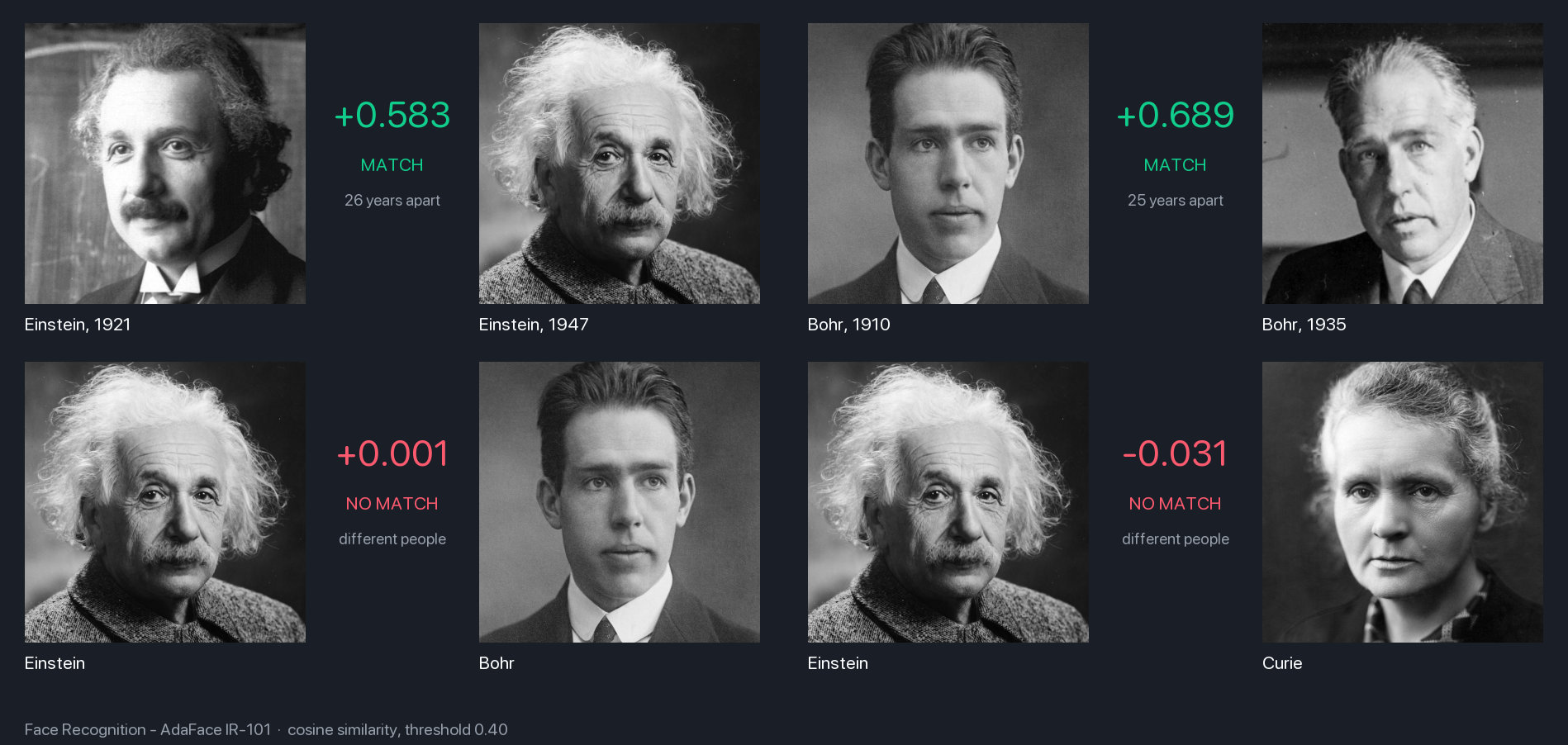
So I put all five, plus AdaFace’s bigger IR-101 variant, through the same small test: five archival portraits, two of them decades apart, and asked each model the same question. Same person or not?
Key takeaways
- All five families share one interface, so swapping models is a one-line change and the rest of your pipeline never notices.
- Every model got every pair right on this test. What separates them is breathing room: AdaFace IR-101 leaves the most, and EdgeFace XXS keeps most of it at a fiftieth of the size.
- A similarity threshold belongs to one model. SphereFace scores strangers three times higher than AdaFace does, so tune the cutoff again whenever you switch.
What every model here has in common
All five families do the same three things, in the same order:
- Take the face and the five landmark points the detector found (eyes, nose, mouth corners), and straighten it into a 112×112 crop.
- Turn that crop into 512 numbers. This is the embedding, and it is the only thing the model returns.
- Compare two embeddings with cosine similarity. Two photos of the same person point in nearly the same direction and score high; two strangers score near zero. You choose the threshold that separates the two.
Because every family implements the same BaseRecognizer interface, the code that calls them is identical. Pick one, and if you change your mind later you change one line of code.
| Family | Default variant | On disk | Trained on |
|---|---|---|---|
| AdaFace | IR_18 | 96 MB | WebFace4M |
| ArcFace | MNET | 14 MB | WebFace600K |
| EdgeFace | XXS | 5 MB | WebFace4M/12M |
| MobileFace | MNET_V2 | 9 MB | MS1MV2 |
| SphereFace | SPHERE20 | 98 MB | MS1MV2 |
The model zoo lists each family’s published accuracy, but those numbers were never meant to be compared with each other. AdaFace reports IJB-B and IJB-C, the others mostly report LFW and its harder variants, and no two families trained on the same data. Which is exactly why I wanted one test where everything else stays fixed.
Four of the five families came into UniFace through standalone repos: AdaFace through adaface-onnx, EdgeFace through edgeface-onnx, and MobileFace and SphereFace through face-recognition. The ArcFace weights are InsightFace’s.
The test: five old photographs, six models
The photographs are the ones in the figure at the top: Einstein in 1921 and 1947, Bohr in 1910 and 1935, and a single portrait of Curie. That gives two same-person pairs a quarter of a century apart, which is a harder ask than most benchmarks, and eight pairs of strangers where the right answer is “no”.
For each model I kept three numbers: the score on each same-person pair, and the highest score it gave to any pair of strangers, because that is the number a threshold has to stay above. Everything ran on one laptop with the same detector, RetinaFace, feeding every model the same landmarks. Latency is a single embedding on the CPU, alignment included.
| Model | ms per face | Einstein, 26 years apart | Bohr, 25 years apart | Highest score for two different people |
|---|---|---|---|---|
| AdaFace IR-101 | 50 | +0.56 | +0.68 | +0.06 |
| AdaFace IR-18 | 7 | +0.51 | +0.59 | +0.11 |
| ArcFace MNET | 4 | +0.47 | +0.54 | +0.10 |
| EdgeFace XXS | 2 | +0.49 | +0.56 | +0.13 |
| MobileFace MNET_V2 | 3 | +0.57 | +0.63 | +0.17 |
| SphereFace SPHERE20 | 6 | +0.60 | +0.58 | +0.18 |
None of the six failed. Even ArcFace’s lowest same-person score, +0.47, is comfortably above the highest stranger score in the whole table, SphereFace’s +0.18, so UniFace’s default threshold of 0.40 would have made the right call with every model here.
What differs is the breathing room between those two numbers. AdaFace IR-101 keeps its same-person scores and its stranger scores half a point apart. The five default models manage a little less, and they are close to each other. EdgeFace XXS is the surprise: it gives up only a little of that margin while being roughly a fiftieth of IR-101’s size and about thirty times faster.
SphereFace is the odd one out. It produces the highest same-person score in the table and also the highest stranger score. Its scores run higher across the board, which is harmless until you pick a threshold.
If you compare the table with the figure at the top, the scores differ by a few hundredths. The figure comes from an earlier build of the demo set; the ordering is the same.
Why a threshold from one model is wrong for another
UniFace’s docs suggest 0.40 as a relaxed cutoff, 0.50 as balanced and 0.60 as strict, and the FAISS store uses 0.40 unless you tell it otherwise. Those bands were written with one model in mind, and the table shows why they do not travel.
Move the cutoff to 0.60 and the models stop agreeing. Three still recognise one of the two men but lose the other, the other three lose both, and all of them keep rejecting strangers. The same photos and the same cutoff give six different answers.
In short Treat the threshold as part of the model. Sweep it on a handful of your own same-person and stranger pairs, and sweep it again whenever you swap recognisers. The thresholds page has a short script for exactly that.
Using it in UniFace
Detect a face, turn it into an embedding, compare two of them:
import cv2
from uniface import RetinaFace, AdaFace
from uniface.face_utils import compute_similarity

detector, recognizer = RetinaFace(), AdaFace()

def embed(path):
    image = cv2.imread(path)
    face = max(detector.detect(image), key=lambda f: f.confidence)
    return recognizer.get_normalized_embedding(image, face.landmarks)   # (512,)

score = compute_similarity(embed("einstein_1921.jpg"), embed("einstein_1947.jpg"), normalized=True)
print(f"{score:+.3f}", "match" if score > 0.4 else "no match")
FaceAnalyzer bundles the same steps. It picks ArcFace when you give it nothing, and any of the five slots in; pass recognizer=None if you only want detection:
from uniface import FaceAnalyzer, EdgeFace, SCRFD

analyzer = FaceAnalyzer(detector=SCRFD(), recognizer=EdgeFace())
faces = analyzer.analyze(image)
faces[0].embedding.shape   # (512,)
Both notebooks run in the browser:
| Notebook | Colab | Kaggle |
|---|---|---|
| Face verification, one-to-one |  |
 |
| Face recognition pipeline, step by step | |
|
Things that quietly change the score
A few things moved the numbers while I was measuring, and none of them are in the model.
- The detector is part of the recogniser. Alignment uses the detector’s landmarks, so a different detector means a slightly different crop. Swapping RetinaFace for SCRFD moved IR-101’s Einstein score by about 0.01. That is not much, but it is enough that two pipelines never print the same number.
FaceAnalyzer()with no arguments picks the small SCRFD variant, which is fine for portraits and weak on crowds. PassSCRFD()yourself for the stronger 10G model when faces are small.- BlazeFace cannot feed recognition at all. Its six keypoints mark the centre of the mouth rather than the corners, so there is nothing to align on, and
FaceAnalyzerswitches recognition off with a warning. The Face Mesh post shows what those keypoints are for instead. - Embeddings only mean something within one model. If you switch, re-embed the whole gallery, FAISS index included.
- Identical twins scored higher than a genuine same-person pair while the demo set was being built. The model compares appearance, and twins look alike.
FAQ
Can I compare an AdaFace embedding with an ArcFace one?
No. Both are 512 numbers, but each model arranges its space differently, and a cosine between them is noise. Pick one model per gallery and re-embed everything when you change it.
My faces are already aligned 112×112 crops. Do I still need a detector?
No. Call
get_embedding(crop)without landmarks and the alignment step is skipped. You get the raw(1, 512)output back, so divide by its norm before comparing.
Which model for a phone or a single-board computer?
EdgeFace XXS. It is about 5 MB, the fastest of the six, and it kept most of the big model’s margin in this test. MobileFace MNET_V2 is the next step up if you want a slightly wider margin for 9 MB.
Related
- UniFace: A Unified Face Analysis Library for Python — the library all five recognisers ship in, with the detectors that feed them.
- RetinaFace: Single-Stage Face Detection in PyTorch — the detector whose landmarks aligned every crop in the table above.
- Will a Photo Fool Your Face Login? Anti-Spoofing in UniFace — the liveness check that should run before any of these models gets a say.