Will a Photo Fool Your Face Login? Anti-Spoofing in UniFace
Face recognition answers one question: who is this? It never asks whether the thing in front of the camera is a person or a picture of one, and a recogniser will happily match a photo of you held up to a webcam. Anti-spoofing is the check that runs before recognition gets a say.
UniFace ships MiniFASNet for it, a model small enough to run on every frame. The model comes from Minivision’s Silent-Face-Anti-Spoofing; the ONNX weights UniFace downloads live in my face-anti-spoofing repo, which also runs it on its own. I gave it a live capture, a print of that capture and a screen replay of it, and then a few photographs it was never meant to see.
Key takeaways
- MiniFASNet judges how a face reached the camera, not whose face it is. A print and a screen replay of the same person both come back Fake.
- A verdict costs well under a millisecond on a laptop CPU, so it can run on every frame.
- One frame is not enough for a print. It lands just past the halfway line, so vote over a few frames before you trust the answer.
What it is looking at
A presentation attack is anything you put in front of a camera instead of your face: a printout, a phone screen, a mask, a video playing on a laptop. MiniFASNet tells those apart from skin by texture rather than identity. Paper has grain, screens have a glow and a faint grid, and a real face has neither.
Give it the bounding box from any detector and it hands back a verdict, Real or Fake, with a confidence between 0 and 1.
There are two variants, V1SE and V2, both under 2 MB. They differ in how much of the surroundings they look at: V1SE crops a region four times the size of the face box, V2 a little under three times.
That context is part of the signal, because the edge of a phone or the border of a photograph is often the giveaway. So pass the detector’s box and let the model choose the crop.
The model has no idea where the pixels came from. A digital photograph of a real person is a direct capture of skin, and the model has every reason to call it Real. It only starts to say Fake when the pixels carry the fingerprints of paper or glass.
The test: one face, three ways
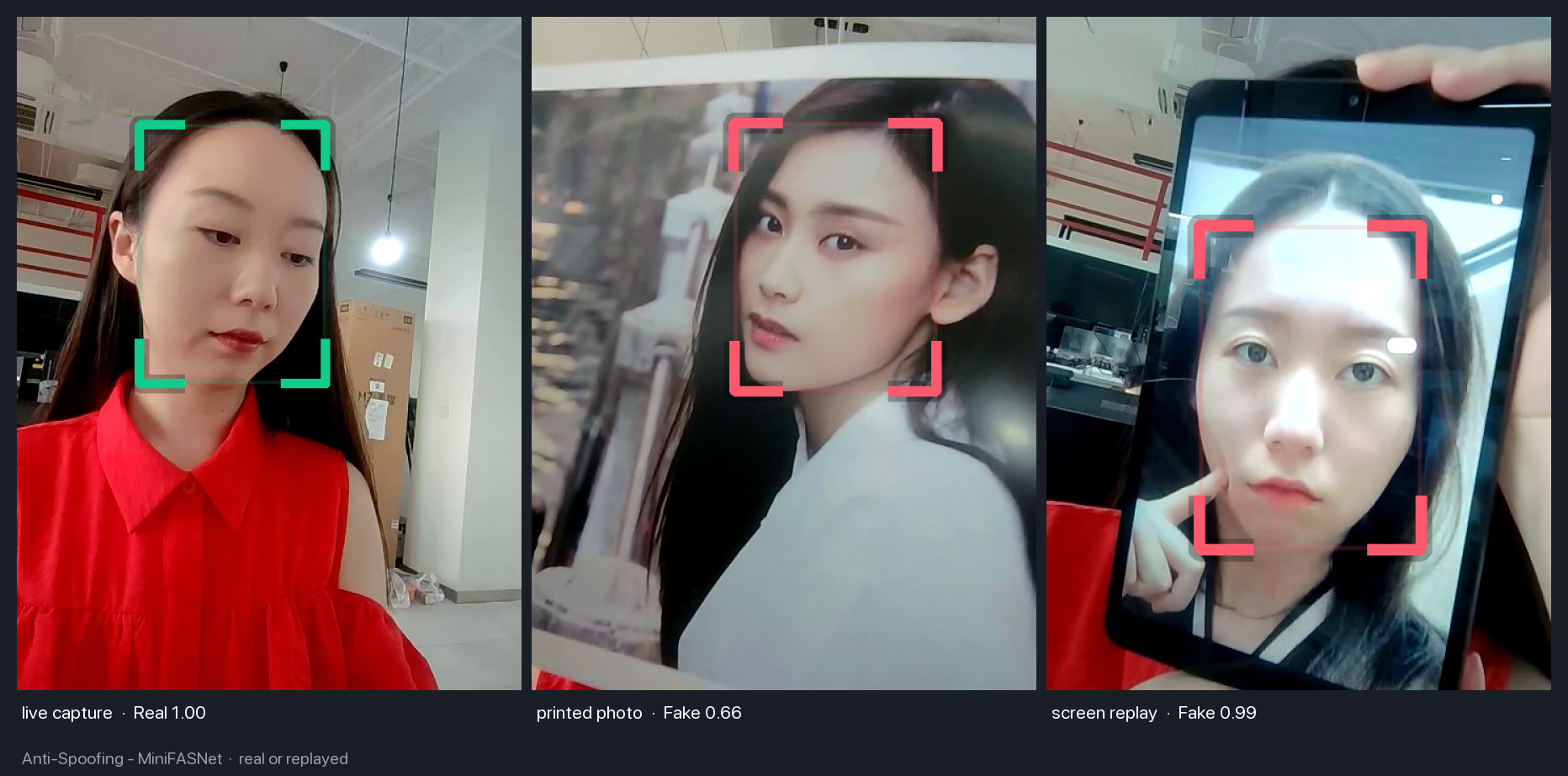
The three frames in the figure come from one session: a live webcam capture, that capture printed and held up to the same webcam, and the same capture playing on a tablet screen. Everything but the medium is identical. I ran both variants on all three, with RetinaFace supplying the boxes.
| Frame | V2 (default) | V1SE |
|---|---|---|
| Live capture | Real 1.00 | Real 1.00 |
| Printed photo | Fake 0.54 | Fake 0.52 |
| Screen replay | Fake 1.00 | Fake 0.99 |
The live frame and the screen replay are easy, and both variants are certain about them.
The print is the one to pay attention to. Both models call it Fake, but with a confidence barely past 0.5, which is the point where is_real flips. Softer lighting or a better printer could push a single frame over the line. For prints, vote across a handful of frames; one frame this close to the line is close to a coin toss.
Each verdict took about 0.7 ms on a laptop CPU, excluding detection. The figure comes from an earlier build of the demo set, and its print reads 0.66 where my run reads 0.54; the verdicts are the same.
What it says about photographs it was never shown
To see what the model keys on, I fed it things that are neither a live face nor a deliberate attack.
| Image | V2 (default) | V1SE |
|---|---|---|
| Einstein, 1947, scanned print | Fake 0.70 | Fake 0.85 |
| Bohr, 1910, scanned print | Fake 0.99 | Fake 0.99 |
| Curie, scanned print | Fake 0.99 | Fake 0.99 |
| Modern group photo, 7 faces | 6 of 7 Real | 7 of 7 Real |
The century-old portraits read as Fake, and confidently so, because they are photographs of prints: the model sees paper grain and halftone dots and does exactly what it was trained to do. The modern group photo, a digital original of real people, reads as Real for nearly every face. Neither result is a mistake. The model detects the medium, and a downloaded file carries no trace of paper or glass unless it was scanned from them.
In short Anti-spoofing belongs on the live camera, where a print or a screen held up to the lens is what it was built to catch. Run it on uploaded images and it will tell you about scanners and printers instead of people.
Using it in UniFace
Detect a face, pass its box, read the verdict:
import cv2
from uniface import RetinaFace, MiniFASNet

detector, spoofer = RetinaFace(), MiniFASNet()

frame = cv2.imread("frame.jpg")
for face in detector.detect(frame):
    result = spoofer.predict(frame, face.bbox)
    print("real" if result.is_real else "fake", f"{result.confidence:.2f}")
For a login flow, collect a short burst of frames and let them vote. Requiring most of them to agree, at a confidence above the default 0.5, is what turns the borderline print above into a clean rejection:
verdicts = [spoofer.predict(f, box).is_real for f, box in frames]   # ~10 frames
is_live = sum(verdicts) >= 0.8 * len(verdicts)
The V1SE variant is one argument away, MiniFASNet(model_name=MiniFASNetWeights.V1SE). There is no notebook for this one yet; python tools/spoofing.py --source 0 runs it on your webcam.
Where it falls short
- Good 3D masks can get past it. The docs list prints, screen and video replays and paper masks as covered, and mark 3D masks as limited; a silicone mask has skin-like texture and little else to give it away.
- Lighting matters more than for detection. A print under soft, even light loses the glare and grain the model relies on, which is exactly the borderline case above.
- The verdict is a probability, so treat it as one factor alongside the recognition score and whatever else your flow checks rather than as the only gate.
- Tight crops hurt. The model wants the surroundings of the face, so pass the detector’s box rather than a crop of your own.
FAQ
Does it need facial landmarks?
No, just the bounding box. Any UniFace detector works, including BlazeFace, whose keypoints cannot feed recognition but are not needed here.
Can I run it on uploaded photos to check they are real people?
No. It tells you how a face reached the sensor; it cannot tell you whether a file is genuine. A digital photo of a real person is a direct capture and comes back Real. Use it on the live camera feed instead.
V2 or V1SE?
V2 is the default and crops closer to the face. V1SE takes in more of the surroundings. On these frames they agreed everywhere except the group photo, where V1SE was more lenient. Start with V2 and only switch if your own frames say otherwise.
Related
- UniFace: A Unified Face Analysis Library for Python — the library MiniFASNet ships in, alongside the detectors that feed it.
- RetinaFace: Single-Stage Face Detection in PyTorch — the detector that supplied every box in the tables above.
- How to Choose a Face Recognition Model in UniFace — the step this check is meant to guard.