RetinaFace: Single-Stage Face Detection in PyTorch
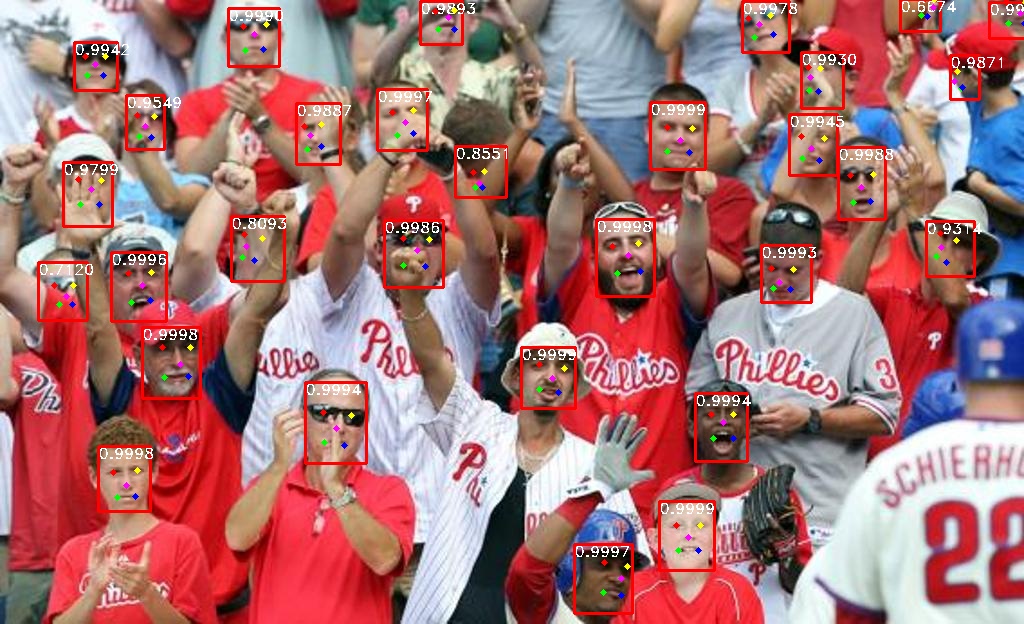
RetinaFace is a single-stage face detector that predicts face bounding boxes and 5-point landmarks in one pass. This implementation adds multiple backbones, WIDER FACE evaluation, webcam inference, PyTorch weights, and ONNX weights. The project is available at github.com/yakhyo/retinaface-pytorch.
Key takeaways
- RetinaFace is single-stage: it predicts face boxes and 5-point landmarks in one pass.
- ResNet34 is the strongest backbone (94.16% easy, 88.90% hard on WIDER FACE multi-scale); MobileNetV1 0.25 is the smallest.
- The MobileNetV2 model detects 632 faces in the crowded selfie example, and every backbone ships with PyTorch and ONNX weights.
Backbones
The repository supports lightweight MobileNet models and heavier ResNet models.
| Backbone | Notes |
|---|---|
| MobileNetV1 0.25 | smallest MobileNetV1 width multiplier |
| MobileNetV1 0.50 | wider MobileNetV1 variant |
| MobileNetV1 | standard lightweight backbone |
| MobileNetV2 | stronger mobile backbone |
| ResNet18 | moderate ResNet option |
| ResNet34 | strongest reported model in the available tables |
| ResNet50 | listed as supported, but release weights are not available in the README table |
The MobileNet models target smaller runtime budgets, while the ResNet models are larger and usually more accurate.
WIDER FACE Results
ResNet34 has the best numbers in both evaluation modes below. The MobileNet variants score lower but keep the runtime footprint much smaller.
Multi-scale Image Resizing
| Backbone | Easy | Medium | Hard |
|---|---|---|---|
| MobileNetV1 0.25 | 88.48% | 87.02% | 80.61% |
| MobileNetV1 0.50 | 89.42% | 87.97% | 82.40% |
| MobileNetV1 | 90.59% | 89.14% | 84.13% |
| MobileNetV2 | 91.70% | 91.03% | 86.60% |
| ResNet18 | 92.50% | 91.02% | 86.63% |
| ResNet34 | 94.16% | 93.12% | 88.90% |
Original Image Size
| Backbone | Easy | Medium | Hard |
|---|---|---|---|
| MobileNetV1 0.25 | 90.70% | 88.12% | 73.82% |
| MobileNetV1 0.50 | 91.56% | 89.46% | 76.56% |
| MobileNetV1 | 92.19% | 90.41% | 79.56% |
| MobileNetV2 | 94.04% | 92.26% | 83.59% |
| ResNet18 | 94.28% | 92.69% | 82.95% |
| ResNet34 | 95.07% | 93.48% | 84.40% |
Small-Face Filtering
The README includes an additional set of WIDER FACE results after filtering faces smaller than 16 pixels during training.
The change improves the easy and medium splits in several cases, because very small noisy annotations create fewer false positives. The tradeoff is visible on the hard split: performance drops sharply when the evaluation depends on very small faces.
The right choice therefore depends on the task. Filtering can be useful if the deployment mostly sees normal-sized faces, while the hard-split drop matters for crowd scenes or surveillance-style images.
Large Selfie Result
The repository also includes a large selfie example using MobileNetV2:
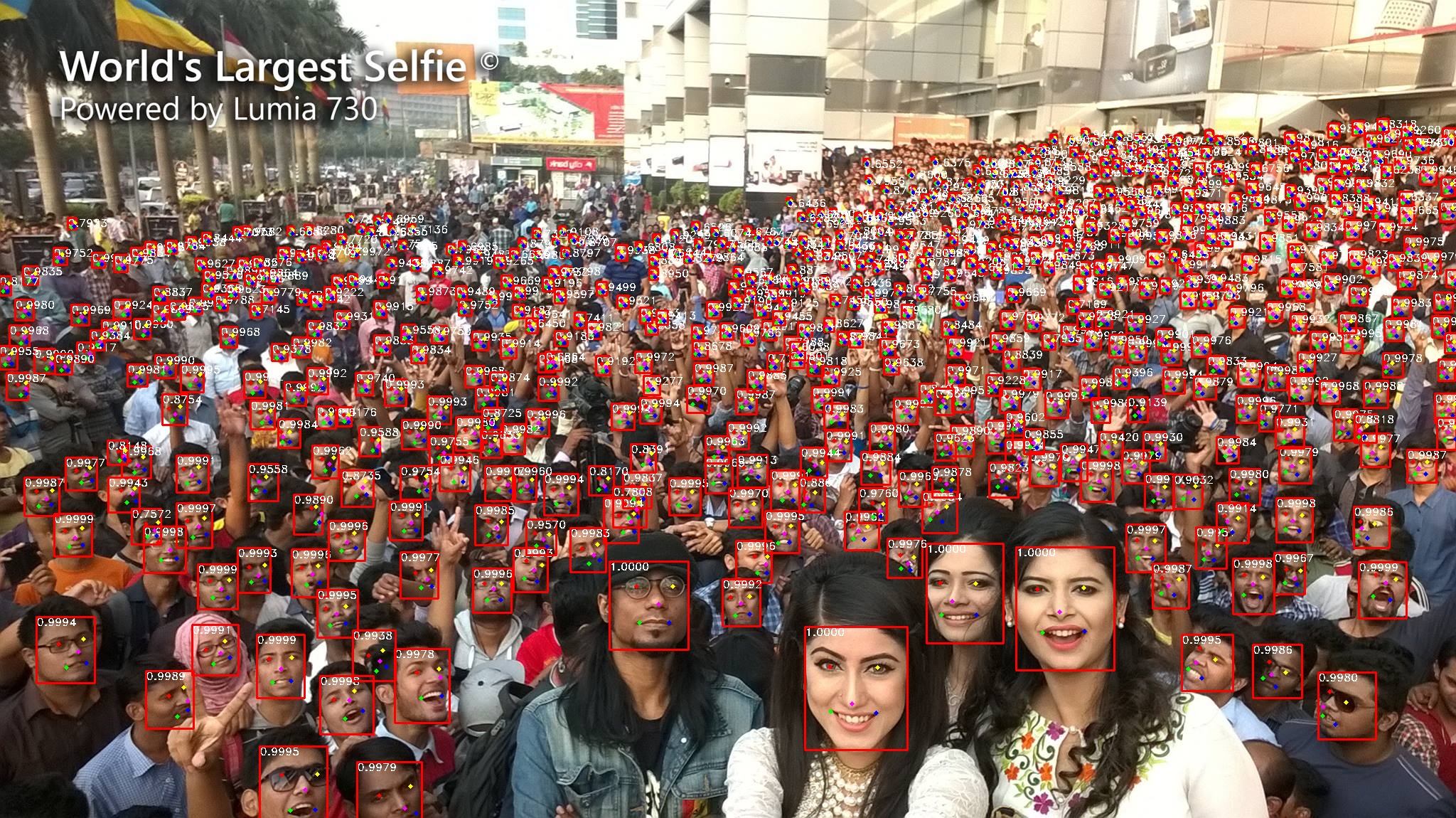
The MobileNetV2 model detects 632 faces in this image.
PyTorch and ONNX
The repository provides PyTorch and ONNX weights for the published MobileNet and ResNet variants. It also includes training, WIDER FACE evaluation, image inference, video/webcam inference, and ONNX export code.
For application code that only needs detection as part of a larger face-analysis pipeline, this model family is also available through UniFace.
FAQ
Which backbone should I choose?
ResNet34 has the strongest reported accuracy (94.16% easy, 88.90% hard on the multi-scale WIDER FACE split). If runtime budget is tight, the MobileNetV1 variants are much smaller, with MobileNetV1 0.25 being the most compact at a clear accuracy cost.
What is the difference between the multi-scale and original-size results?
Multi-scale resizing evaluates the image at several scales, which usually helps on small and hard faces. Original-size evaluation is closer to a single-pass deployment setting, and the two tables let you compare accuracy under each condition.
What does small-face filtering do?
Filtering out faces smaller than 16 pixels during training reduces noisy annotations, which improves the easy and medium splits but lowers hard-split accuracy. It is useful for normal-sized faces and a poor fit for crowd or surveillance images.
When should I use the ONNX weights instead of PyTorch?
Use PyTorch for training and modification, and ONNX when the application only needs inference. ONNX Runtime avoids shipping a full PyTorch runtime, which matters for lighter deployments.
Related
- Tiny-Face: Ultra-Lightweight Face Detection for Edge Devices — sub-2 MB detectors for when even a MobileNet RetinaFace is too heavy.
- UniFace: A Unified Face Analysis Library for Python — the library that bundles this RetinaFace family with recognition, landmarks, and more.
- How to Choose a Face Recognition Model in UniFace — what the five landmarks feed next: alignment and a 512-d embedding.