UniFace: A Unified Face Analysis Library for Python
UniFace is a Python library for face analysis. It provides APIs for face detection, recognition, landmarks, face mesh, parsing, portrait matting, tracking, attributes, image quality scoring, gaze estimation, head pose, anti-spoofing, anonymization, and vector search.
The library is built around a common set of conventions. Detectors return Face objects, recognition models use the same landmark format, and higher-level APIs such as FaceAnalyzer combine common steps when you do not need to wire each module manually.
Installation
Install the CPU version for regular CPU inference or Apple Silicon:
pip install "uniface[cpu]"
Install the GPU version for NVIDIA CUDA:
pip install "uniface[gpu]"
The extras are separate because onnxruntime and onnxruntime-gpu should not be installed together. Models are downloaded on first use, verified with SHA-256, and cached locally.
Face Detection
import cv2
from uniface.detection import RetinaFace

image = cv2.imread("photo.jpg")
if image is None:
    raise ValueError("Could not read photo.jpg")

detector = RetinaFace()
faces = detector.detect(image)

for face in faces:
    print("confidence:", round(face.confidence, 3))
    print("bbox:", face.bbox)
    print("landmarks:", face.landmarks)
This is the smallest useful example. It loads an image, runs a detector, and prints the bounding box and 5-point landmarks for each face.
For webcam input, the same detector can be used frame by frame:
import cv2
from uniface.detection import RetinaFace
from uniface.draw import draw_detections

detector = RetinaFace()
cap = cv2.VideoCapture(0)

while True:
    ok, frame = cap.read()
    if not ok:
        break

    faces = detector.detect(frame)
    draw_detections(image=frame, faces=faces, vis_threshold=0.6)

    cv2.imshow("UniFace detection", frame)
    if cv2.waitKey(1) & 0xFF == ord("q"):
        break

cap.release()
cv2.destroyAllWindows()
For a higher-level pipeline, FaceAnalyzer can run detection, embedding extraction, and optional attributes in one call:
import cv2
from uniface import AgeGender, FaceAnalyzer

image = cv2.imread("photo.jpg")
analyzer = FaceAnalyzer(predictors=[AgeGender()])
faces = analyzer.analyze(image)

for face in faces:
    print(face.bbox, face.sex, face.age)
See the full documentation at yakhyo.github.io/uniface and the source code on GitHub.
What UniFace Includes
| Area | Models and features |
|---|---|
| Detection | RetinaFace, SCRFD, CenterFace, YOLOv5-Face, YOLOv8-Face, and BlazeFace |
| Recognition | AdaFace, ArcFace, EdgeFace, MobileFace, SphereFace |
| Landmarks | 5-point detector landmarks, 106 / 98 / 68-point models, 468-point 3D Face Mesh, and BlazeFace’s 6 MediaPipe keypoints |
| Tracking | BYTETracker-based persistent IDs for video |
| Parsing | BiSeNet semantic face parsing and XSeg masking |
| Matting | MODNet portrait matting for background removal |
| Attributes | Age, gender, race, emotion, eye openness, glasses, sunglasses, and mask |
| Quality | eDifFIQA image quality scoring in four sizes, from 6.6 MB to 250 MB |
| Gaze | MobileGaze for gaze direction estimation |
| Head pose | Pitch, yaw, and roll estimation |
| Anti-spoofing | MiniFASNet |
| Privacy | Pixelate, gaussian, blackout, elliptical, and median anonymization |
| Search | Optional FAISS-backed vector store |
What It Looks Like
Every figure below is rendered from the photographs in the repository by the script that builds the demo set, so the numbers printed on them are measured rather than quoted from a paper. The demo set README records which source feeds which figure and why each model was chosen.
Detection and Landmarks
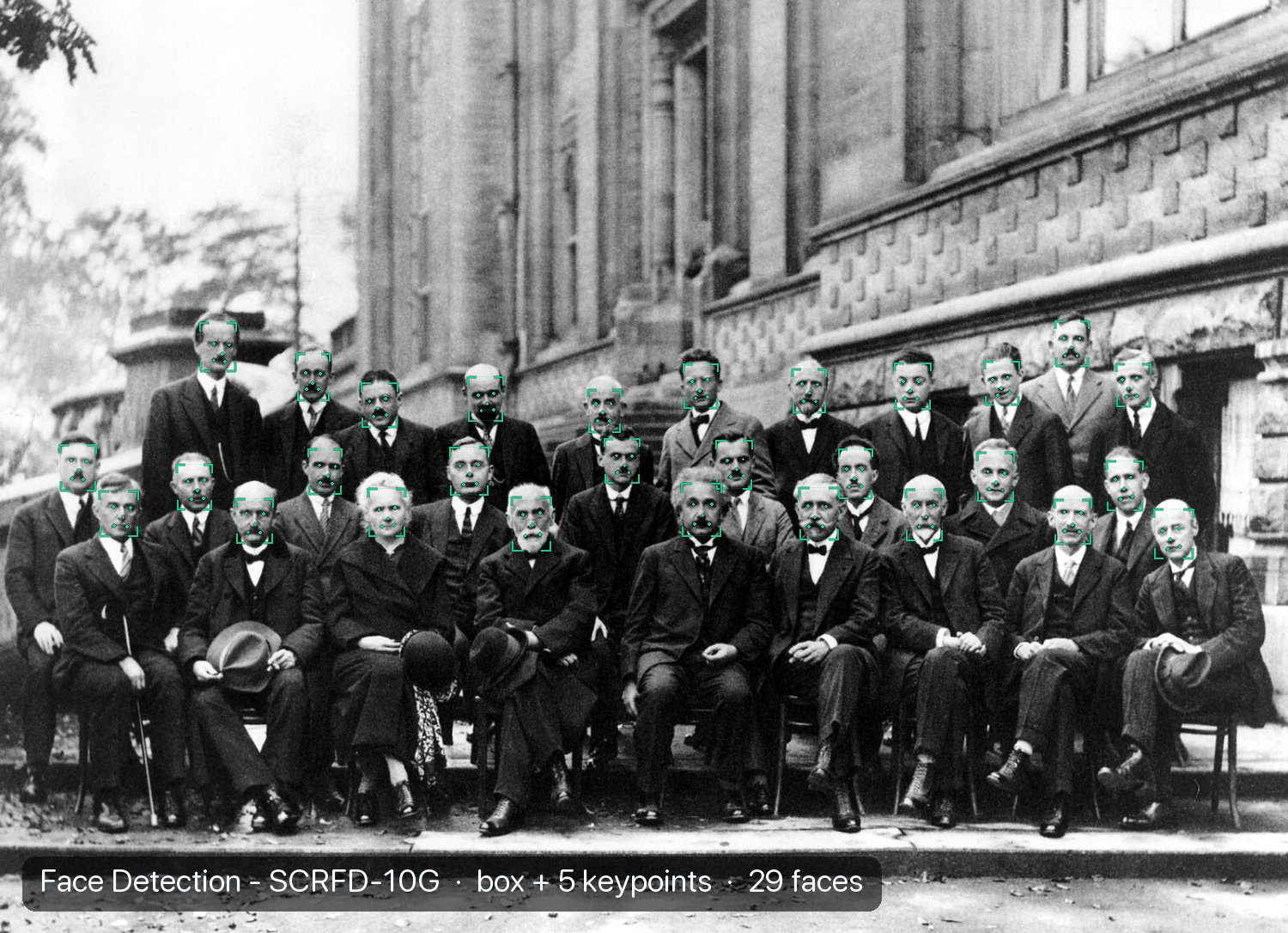
Small faces are the hard case. This is the 1927 Solvay Conference photograph, and SCRFD-10G finds 29 faces in it at 37 to 46 pixels wide:
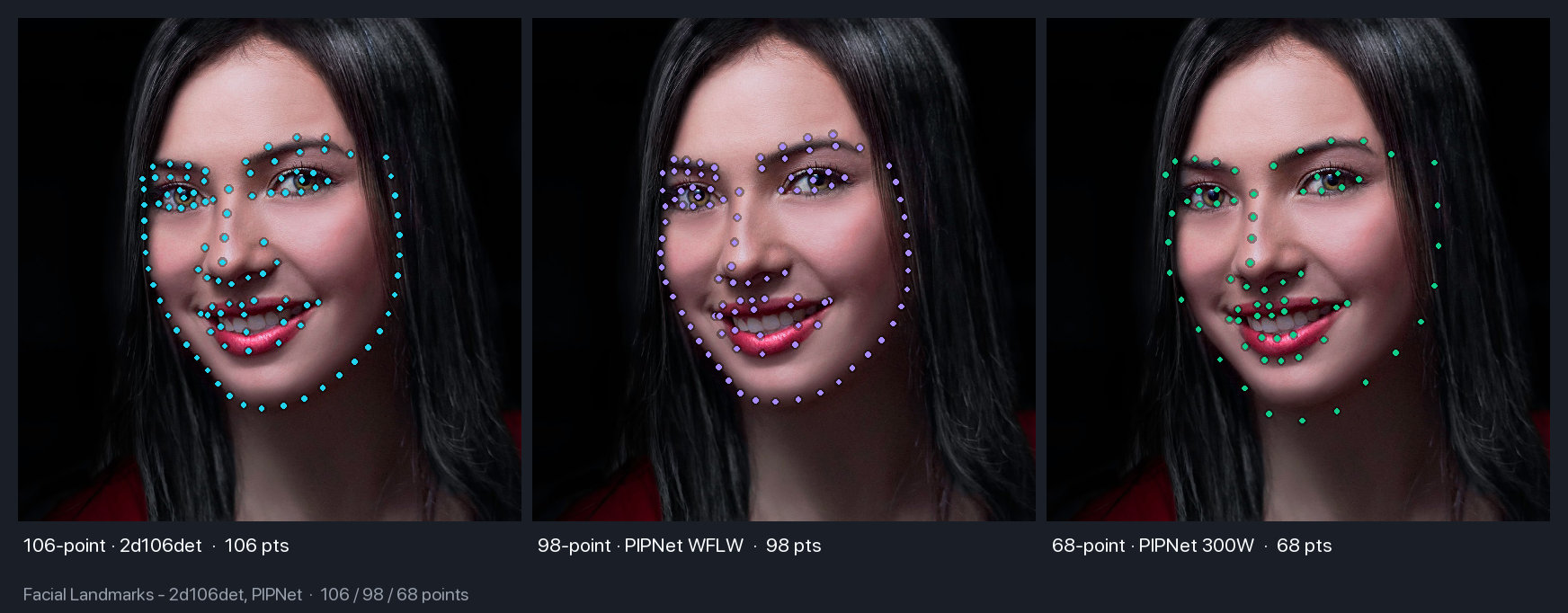
Landmark models run on top of a detection. The same portrait at 106, 98, and 68 points:
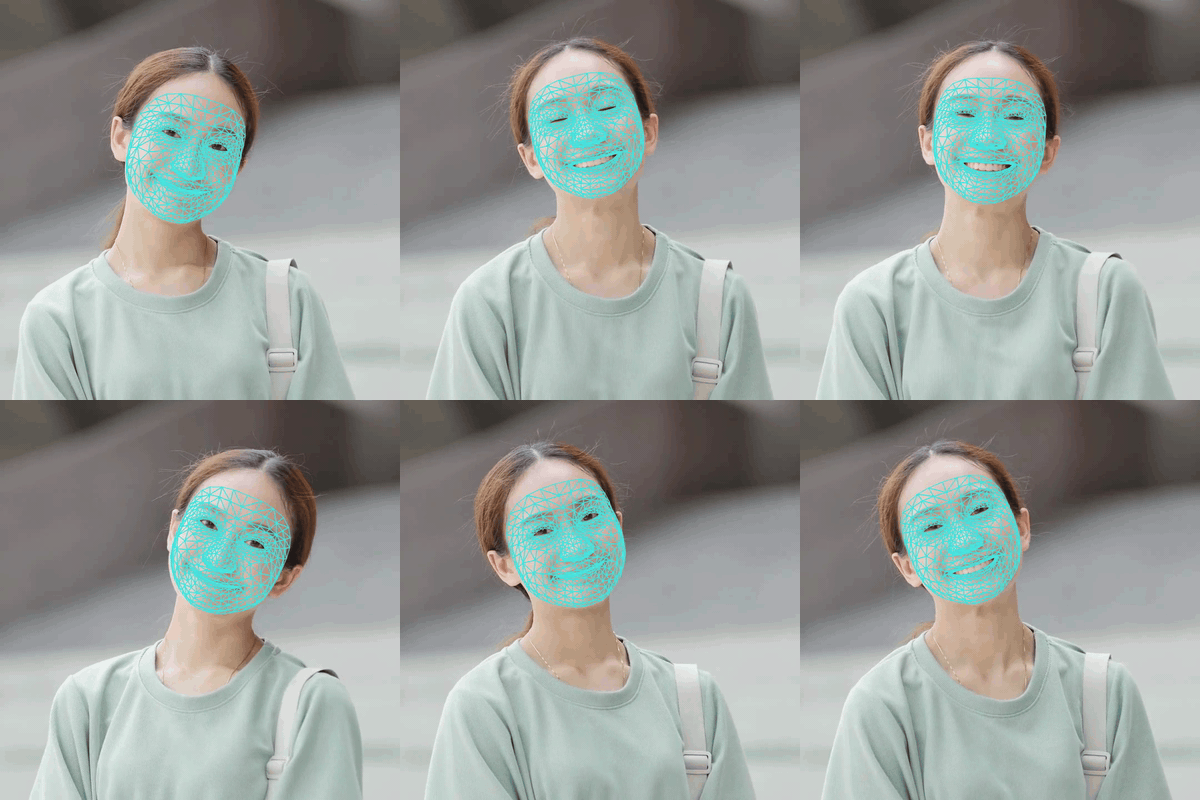
Face Mesh goes further and fits 468 dense 3D points per frame, which holds up under expression changes:
Parsing, Segmentation, and Matting
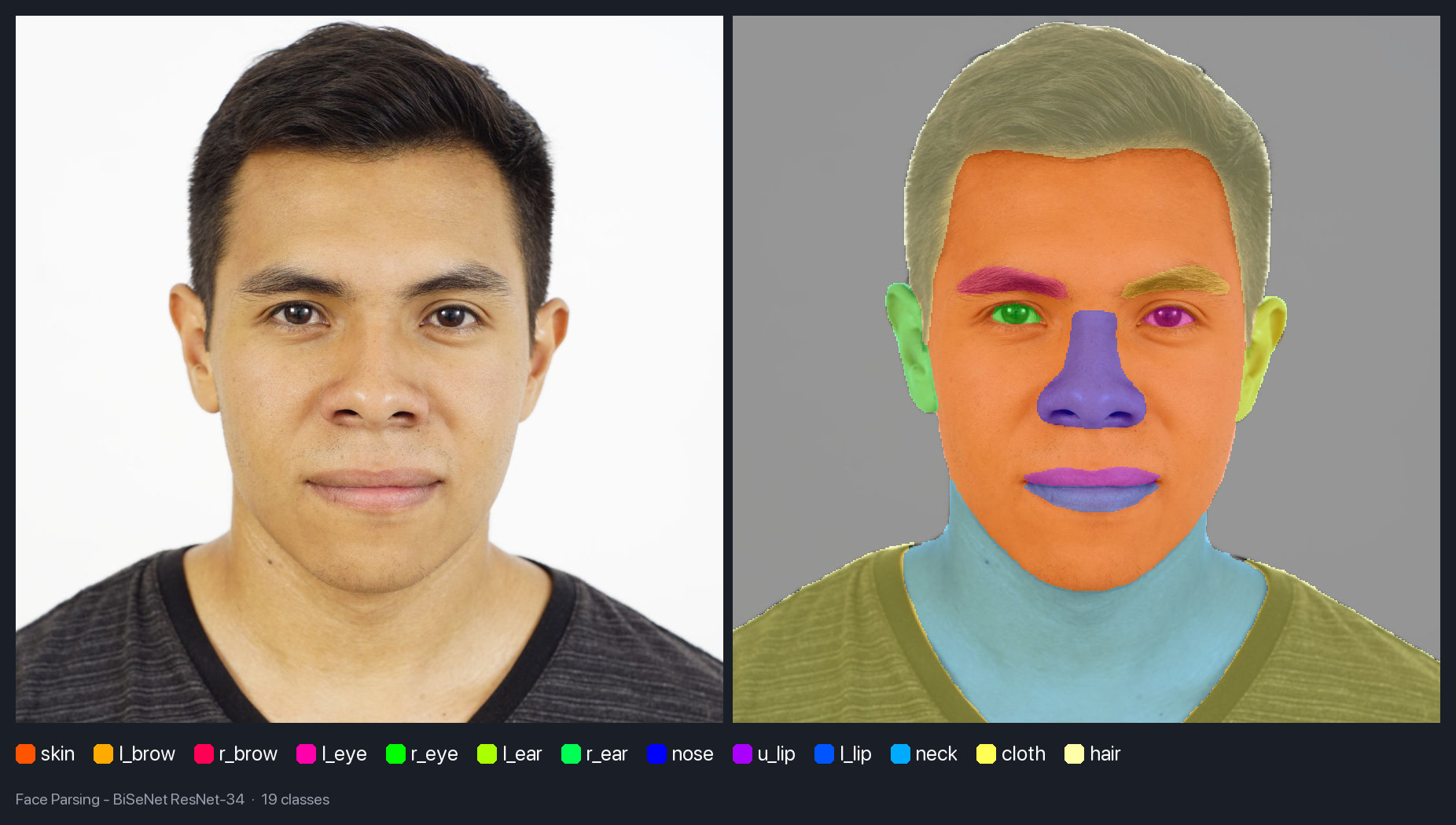
Three different ways to cut a face out of a photograph, each with its own output format. Parsing gives you per-region labels, with 13 of BiSeNet’s 19 classes present here:
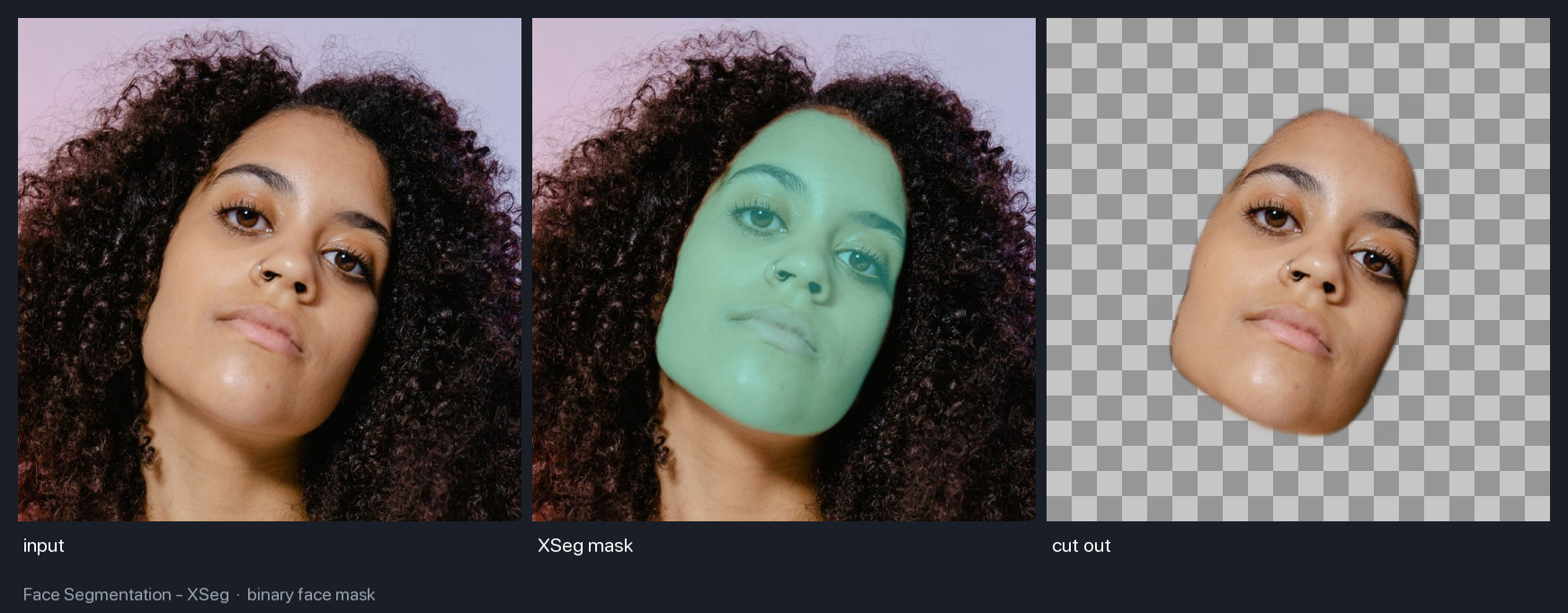
XSeg returns one binary mask instead, which is what you want when the next step is a cut-out rather than a per-region edit:
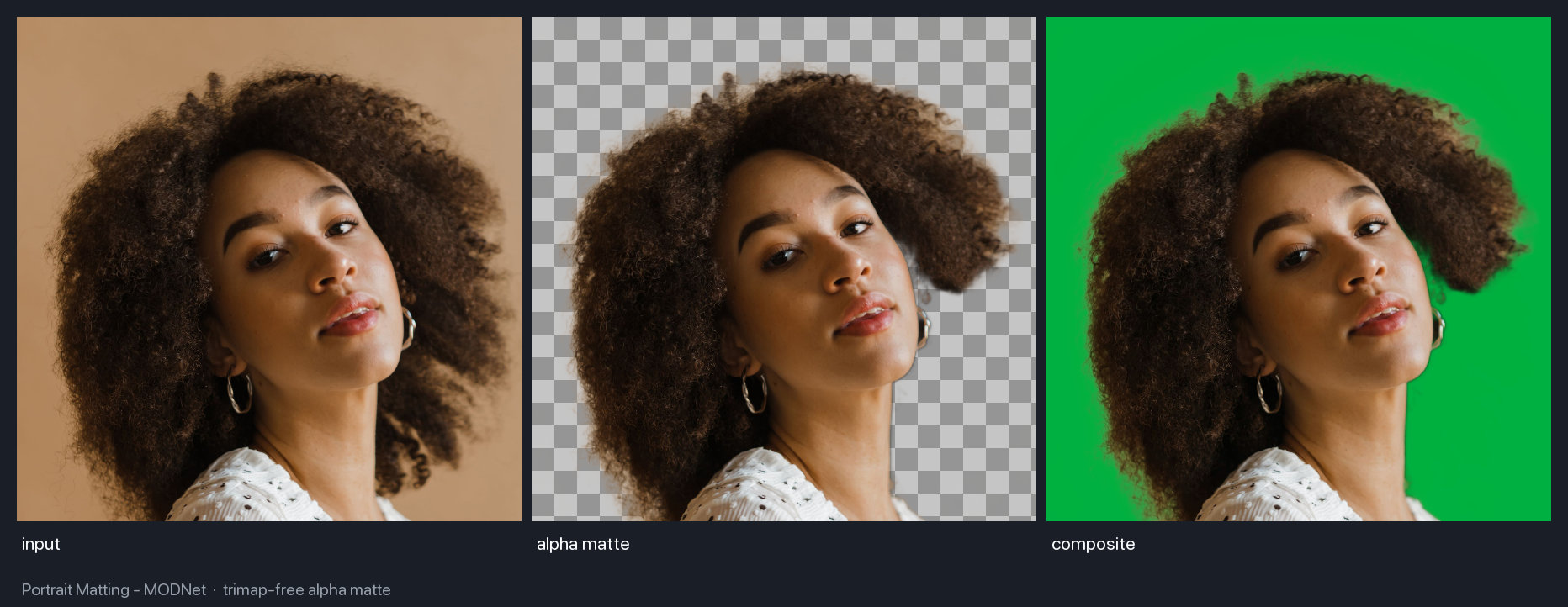
Matting returns an alpha matte rather than a mask, so hair keeps its soft edge when you composite:
Head Pose and Gaze
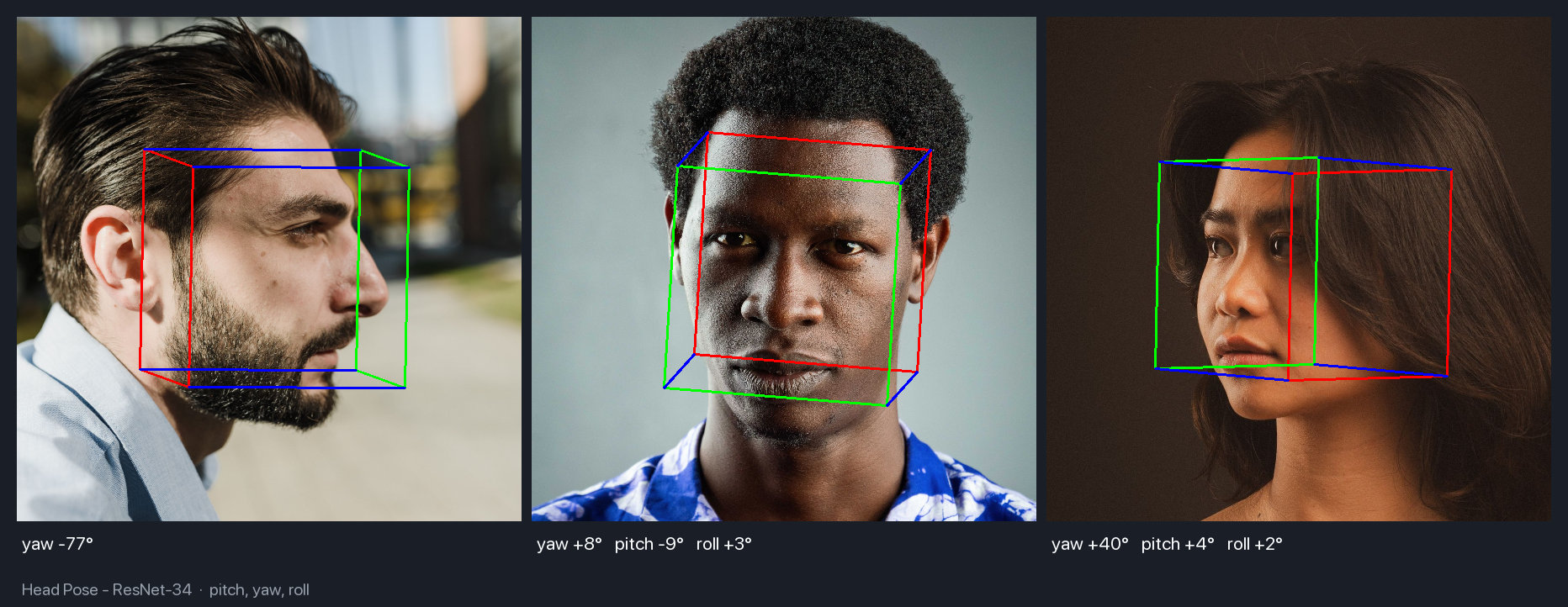
Head pose returns pitch, yaw, and roll, drawn here as a projected cube. The model prints pitch and roll only below 60 degrees of yaw, because past that it reports tens of degrees of tilt on a level head:
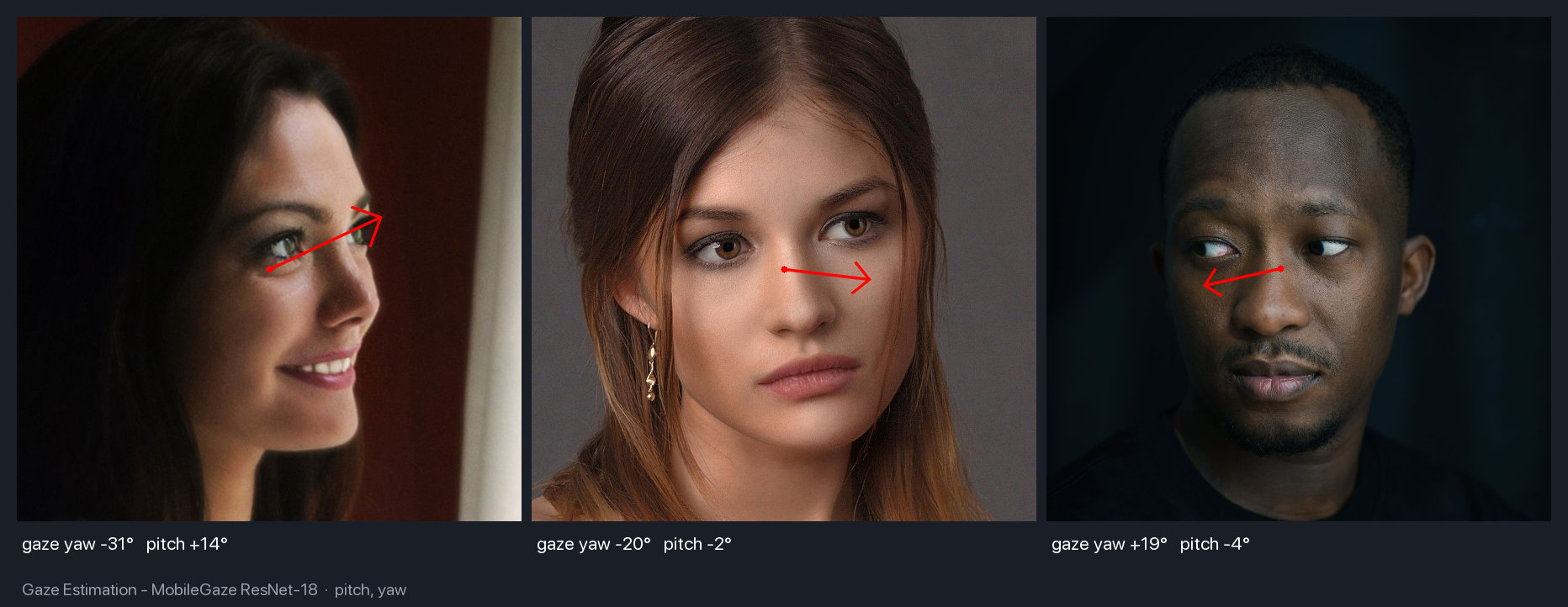
Gaze is a separate estimate and it does not follow the head. The middle subject below faces the camera but is still looking 20 degrees to her left:
Attributes
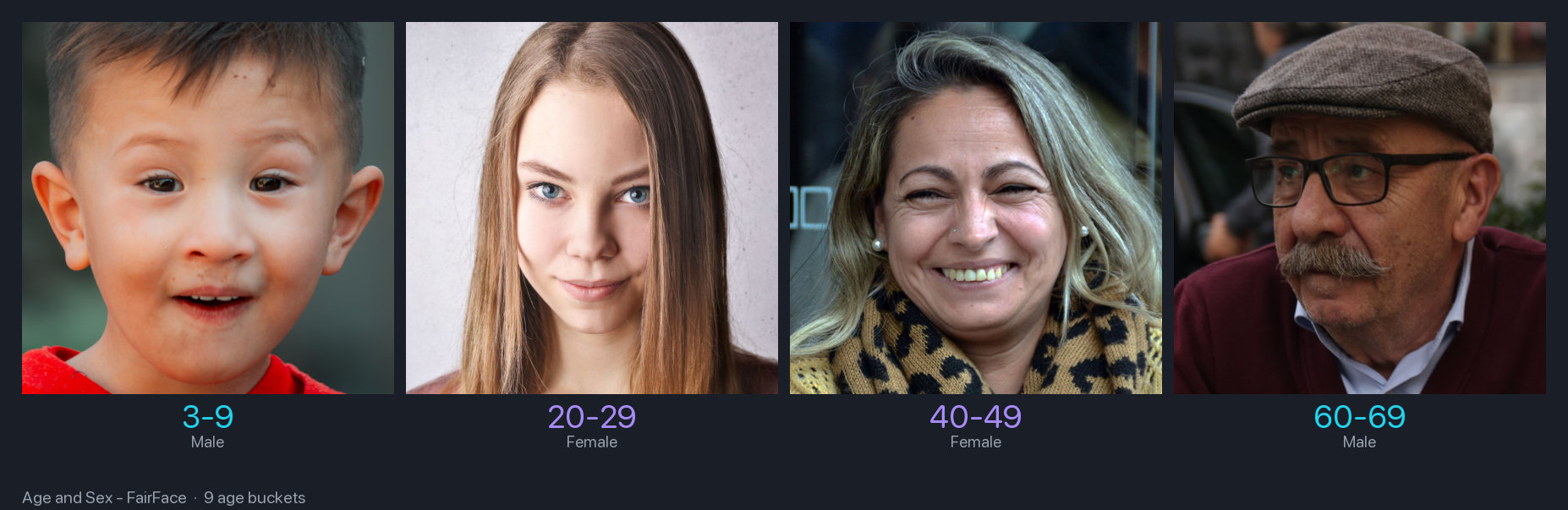
FairFace buckets age rather than predicting a number, and returns sex and race alongside it:
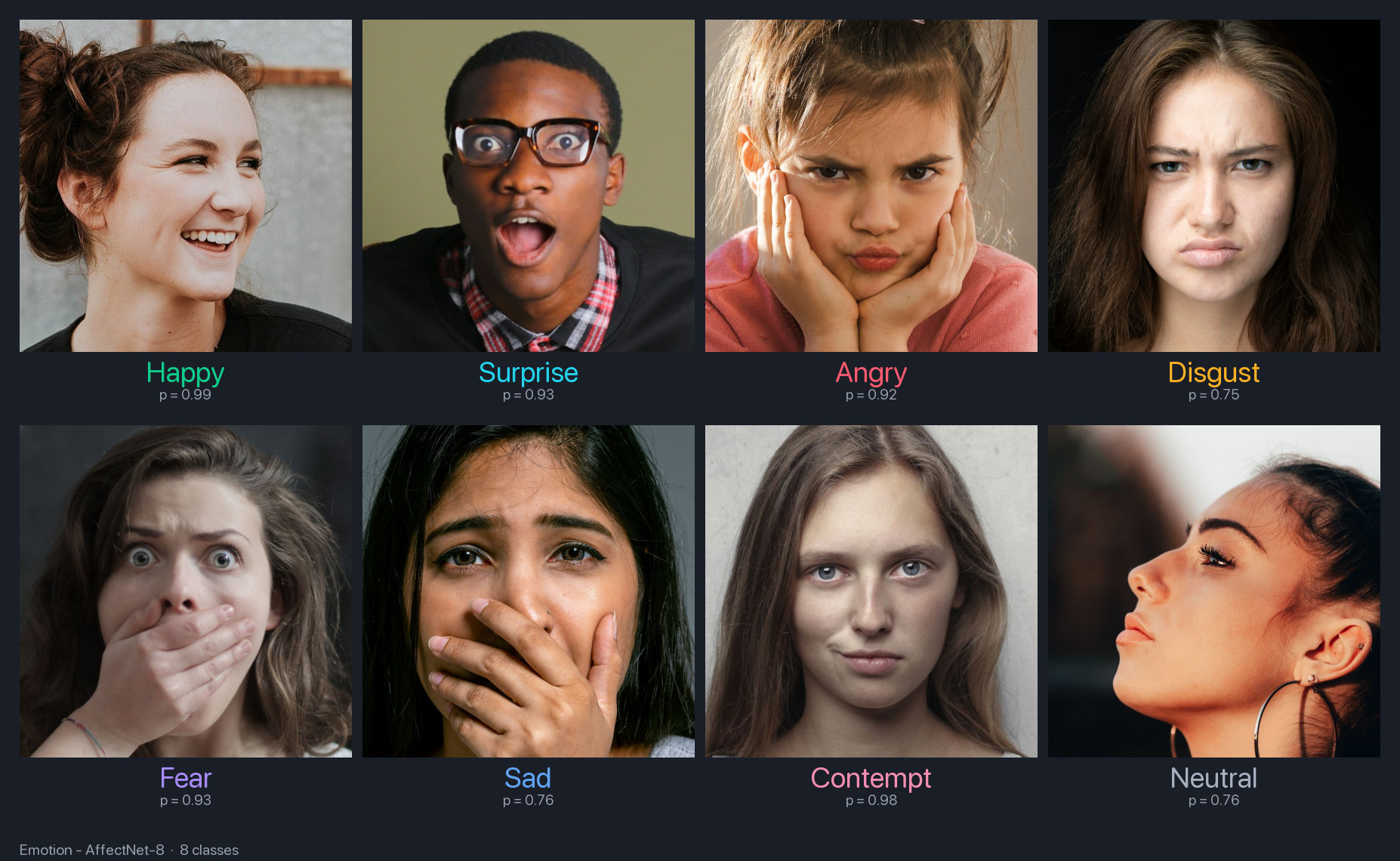
Emotion covers the eight AffectNet classes:
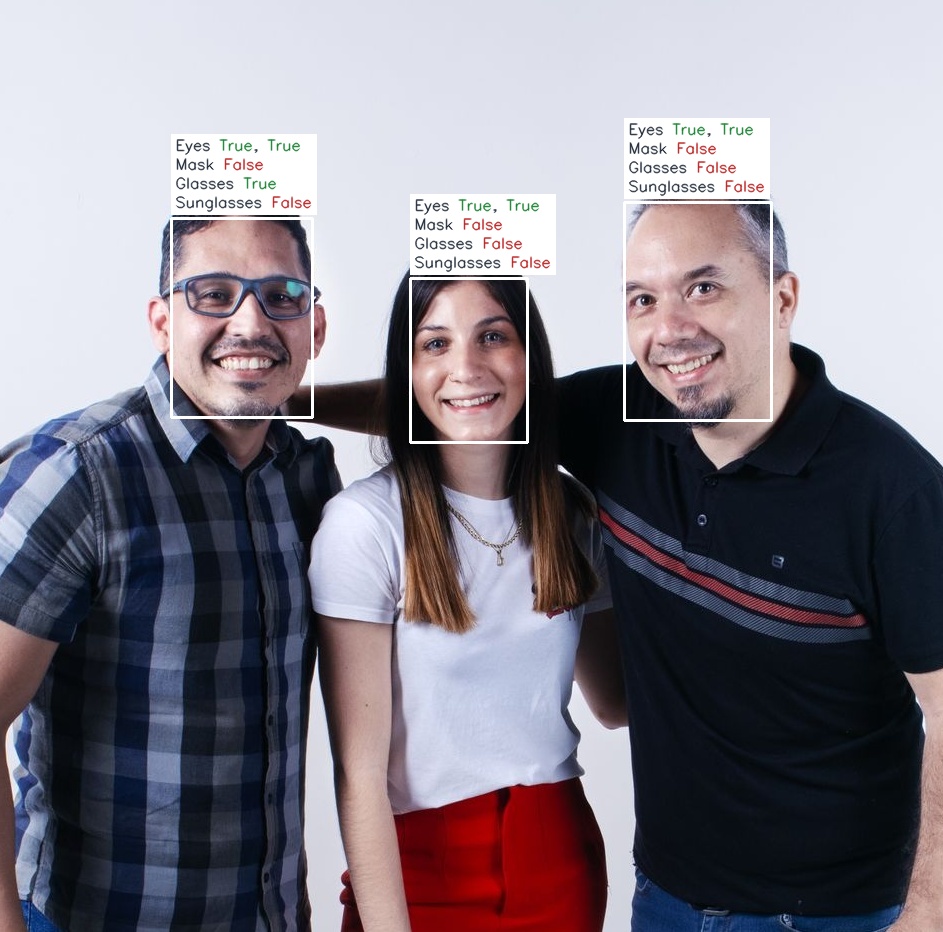
Face attributes run once per detected face, so a group photo returns an independent result for each person. Only the man on the left reads Glasses True:
Recognition, Quality, and Privacy
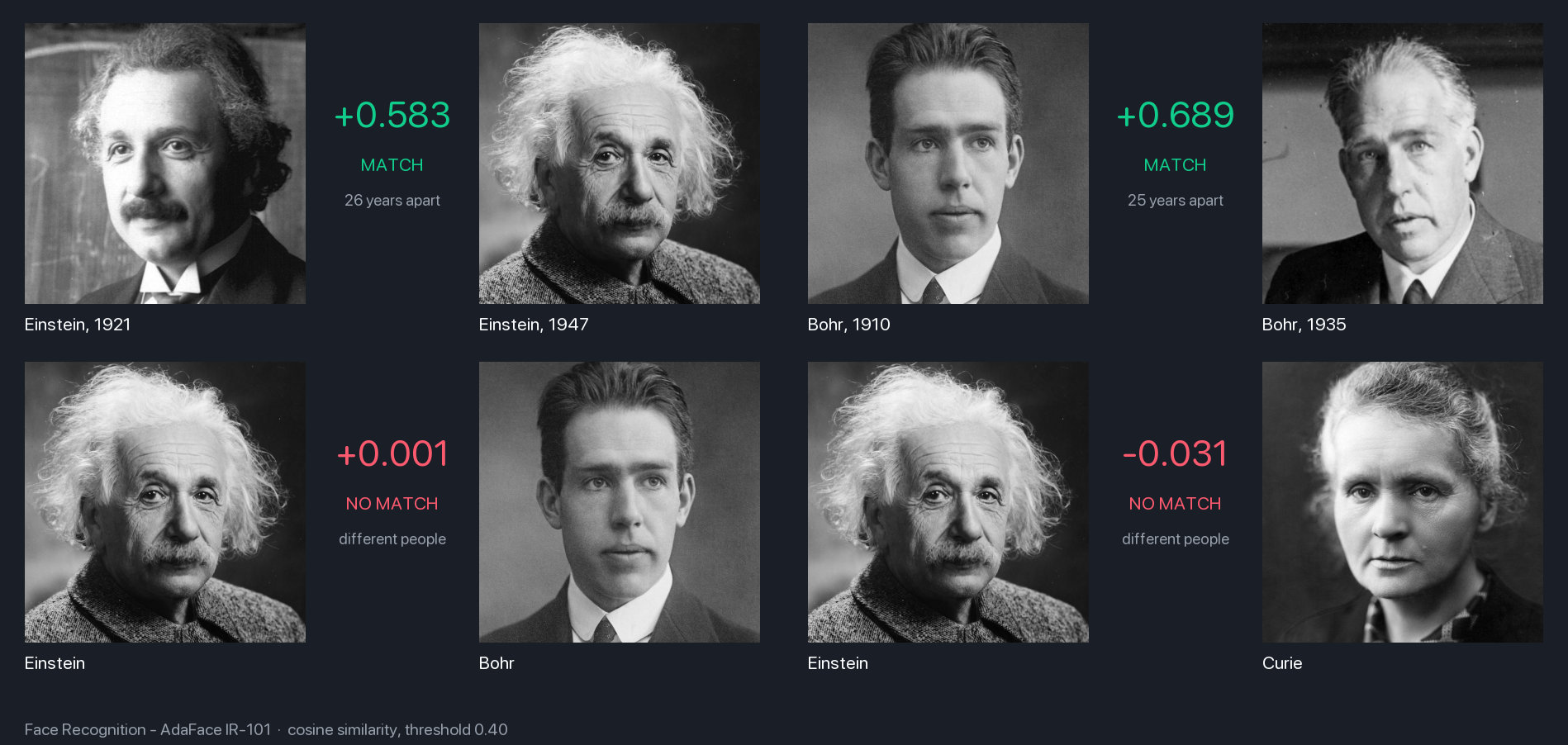
AdaFace holds an identity across decades. Einstein matches himself at +0.583 over 26 years and Bohr at +0.689 over 25, while both of the man-against-man negatives land near zero, well under the 0.40 threshold:
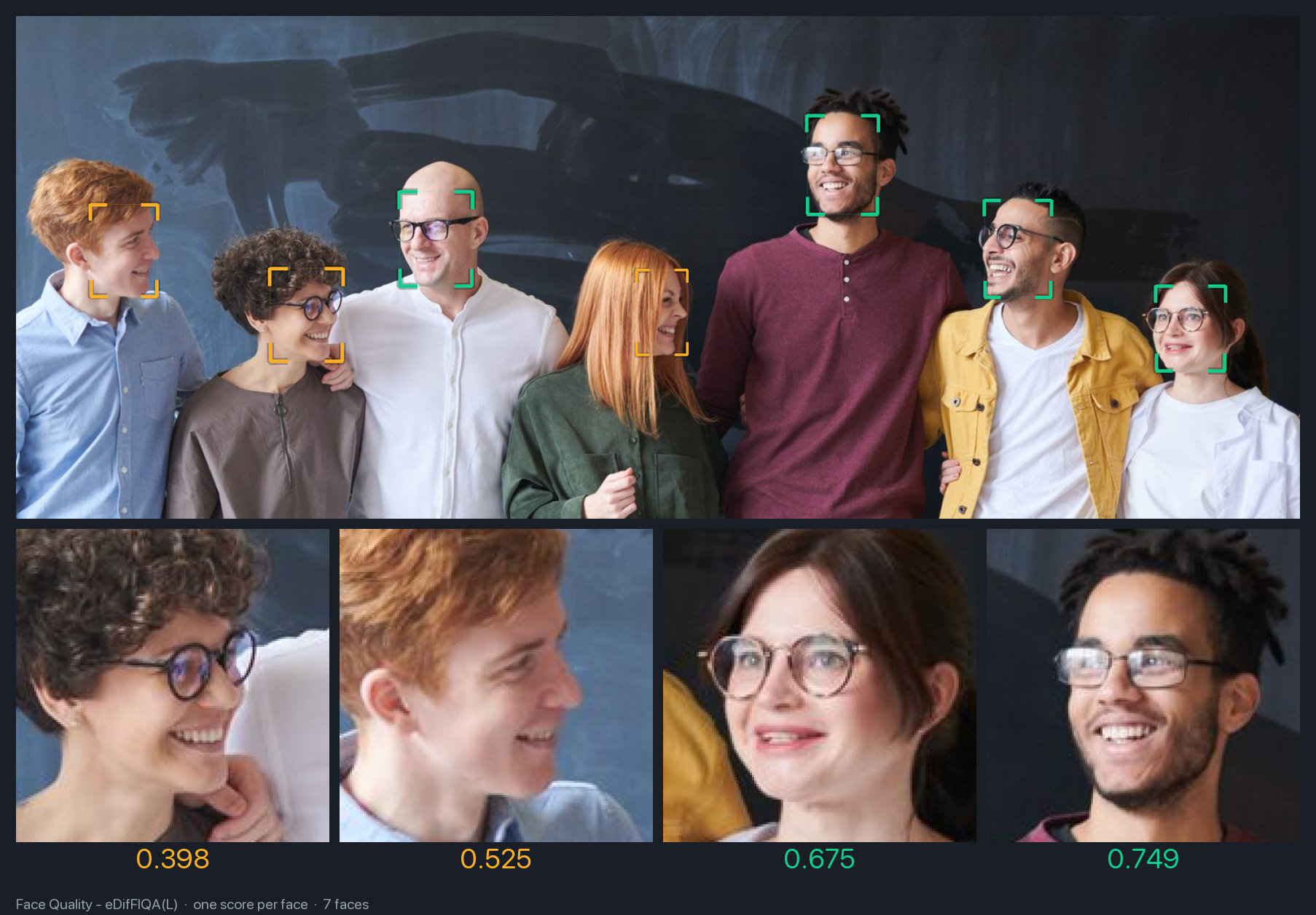
Quality scoring gives you one number per face, which is what you filter on before enrolling someone. Seven faces in this frame span 0.398 to 0.749, and the low scorers are the ones turned away from the camera:
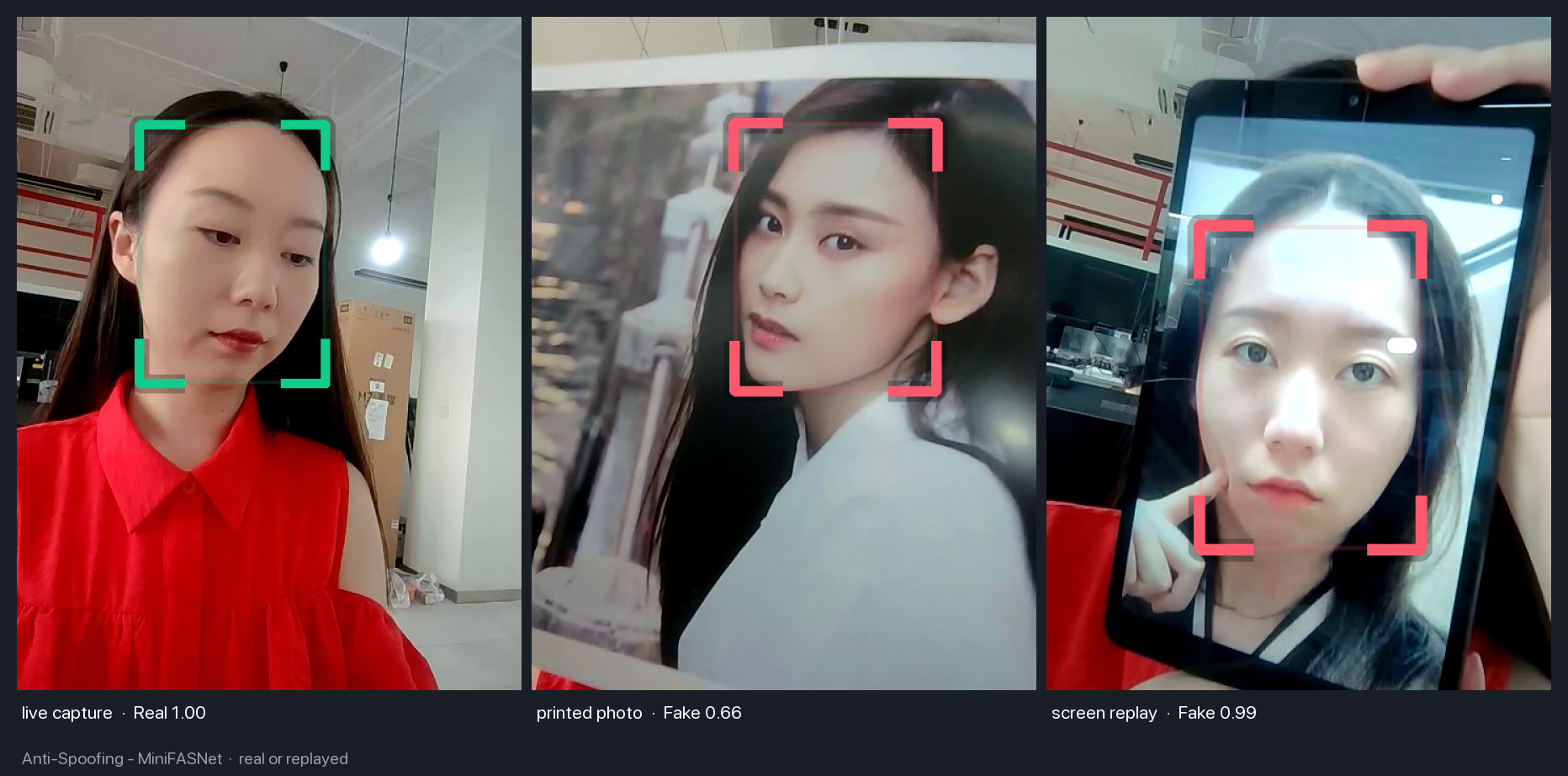
Anti-spoofing judges how a face was presented to the camera. A live capture reads Real at 1.00, and a print and a screen replay of that same capture read Fake at 0.66 and 0.99:
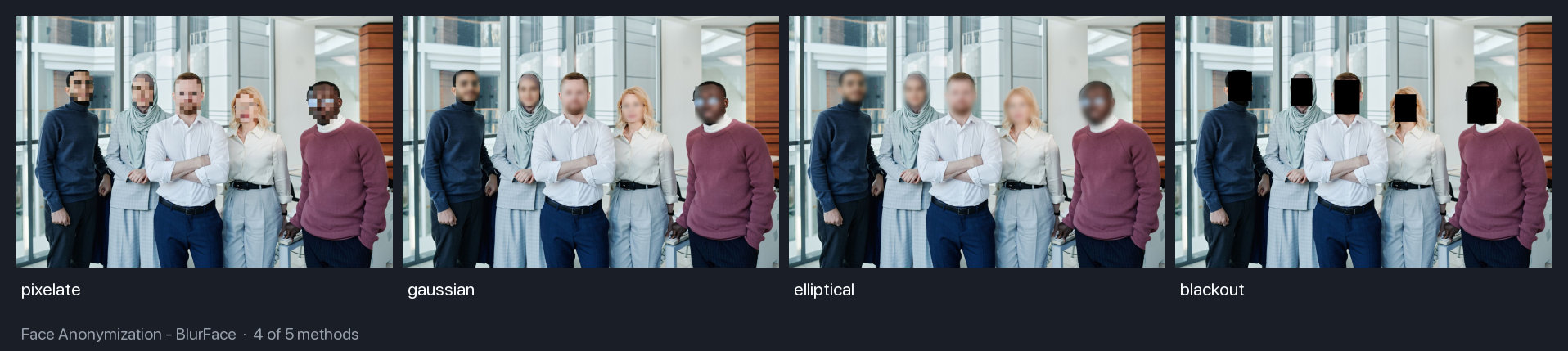
Anonymization ships several methods, so you can match whichever one your compliance requirement asks for:
Notebooks and Demo
The examples can be opened directly in Google Colab:
| Notebook | Colab | Kaggle | Focus |
|---|---|---|---|
| Face Detection |  |
 |
Detection and 5-point landmarks |
| Face Alignment | |
|
Alignment for recognition |
| Face Verification | |
|
Similarity-based identity matching |
| Face Search | |
|
Searching for a person in group photos |
| Face Analyzer | |
|
Detection, recognition, and attributes |
| Face Parsing | |
|
Semantic face segmentation |
| Face Anonymization | |
|
Face blurring and anonymization |
| Gaze Estimation | |
|
Gaze direction prediction |
| Face Segmentation | |
|
XSeg-based masking |
| Face Vector Store | |
|
FAISS-backed embedding search |
| Head Pose Estimation | |
|
Pitch, yaw, and roll |
| Face Recognition | |
|
Recognition without FaceAnalyzer |
| Portrait Matting | |
|
Background removal and compositing |
| Face Attributes | |
|
Eye, glasses, sunglasses, and mask attributes |
| Face Mesh | |
|
Dense 468-point face landmarks |
There is also a live Hugging Face demo at huggingface.co/spaces/yakhyo/uniface.
Library Design
UniFace keeps the individual modules independent, but makes them work together through shared inputs and outputs. You can use only the detector, build a recognition pipeline yourself, or start from FaceAnalyzer when you want the common detection-plus-recognition path.
The library supports macOS, Linux, and Windows, including CPU inference, Apple Silicon, and NVIDIA CUDA through ONNX Runtime providers.
Related Deep-Dives
Several UniFace modules started as standalone projects. These posts go deeper on the individual models the library bundles:
- RetinaFace: Single-Stage Face Detection in PyTorch. The detection backbone family, with WIDER FACE benchmarks.
- Face Parsing with BiSeNet and ResNet Backbones. The semantic segmentation module for per-region masks.
- MobileGaze: Lightweight Gaze Estimation with MobileOne. The gaze direction module.
- Real-Time Head Pose Estimation with MobileNet and ResNet. The pitch/yaw/roll head pose module.
- Eye, Glasses, and Mask Detection: FaceAttribNet in UniFace. The multi-label model behind the eye, glasses, and mask outputs.
- Running MediaPipe Face Mesh in UniFace, Pixel for Pixel. The dense landmark model and BlazeFace detector port.
- How to Choose a Face Recognition Model in UniFace. Five recognition families measured on the same portraits, with per-model thresholds.
- Will a Photo Fool Your Face Login? Anti-Spoofing in UniFace. MiniFASNet on a live capture, a print, a screen replay and old photographs, with the voting pattern that makes it hold up.
- Comparing BiSeNet and XSeg for Face Parsing. The two parsers side by side, with the crop size where the small classes give out and the backbone that turned out safer.