Comparing BiSeNet and XSeg for Face Parsing
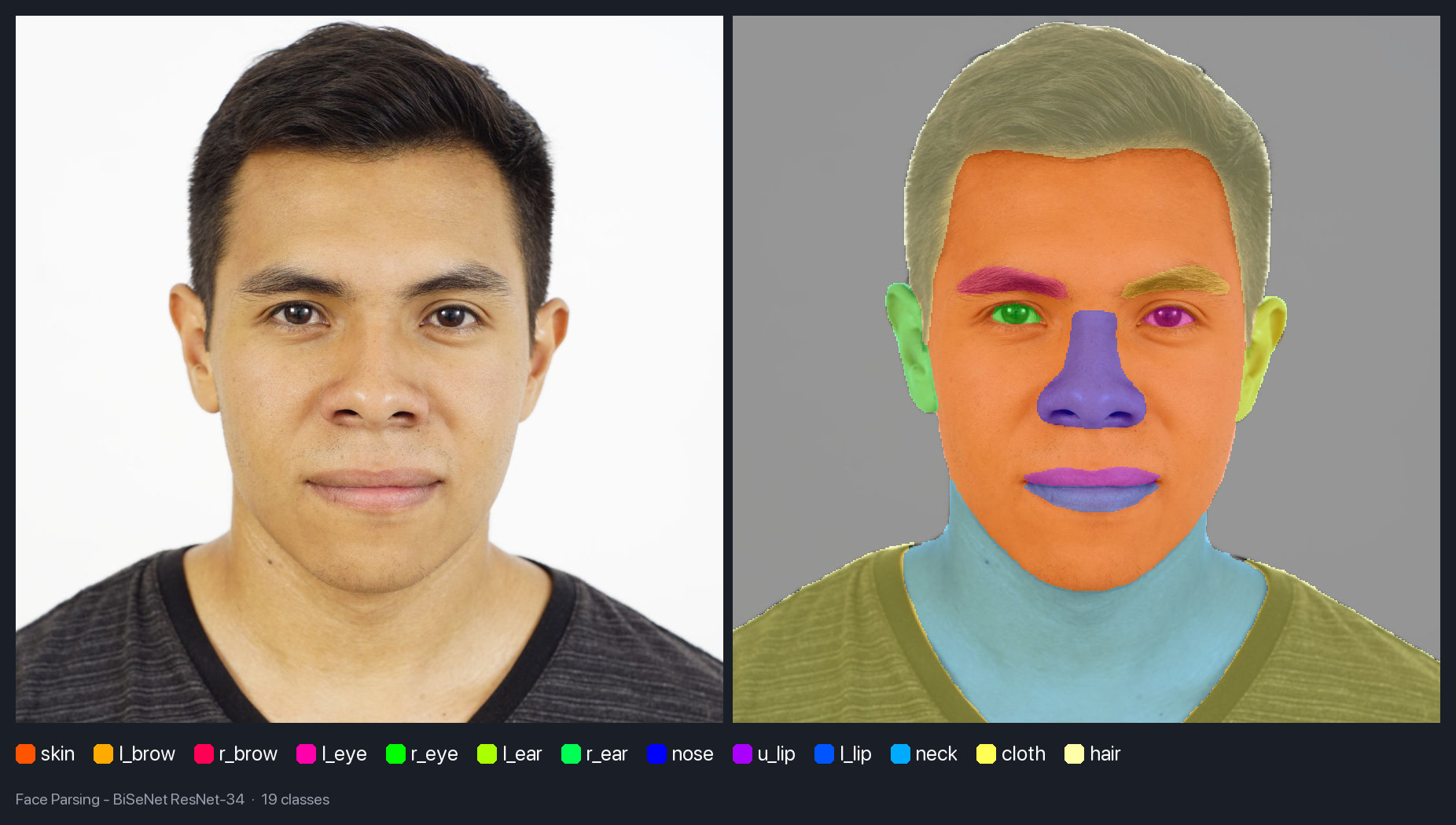
UniFace ships two ways to work out which pixels belong to a face, and they are not variants of the same thing. BiSeNet hands back a labelled map: this pixel is hair, that one is an upper lip. XSeg hands back a single mask that says face or not face, and nothing more.
Picking between them sounds like a question about accuracy. It is really a question about what your next line of code needs to ask. So I ran both on the same three faces and went looking for where the choice bites.
The BiSeNet weights come from my face-parsing repo, trained on CelebAMask-HQ. XSeg is the segmentation model from DeepFaceLab; the ONNX export UniFace downloads lives in face-segmentation.
Key takeaways
- BiSeNet names regions and XSeg only separates the face from the rest. That difference decides the choice more often than accuracy does.
- The smaller BiSeNet backbone was the more reliable one here, and it is 38 MB lighter.
- XSeg returns a probability mask, but under one percent of its pixels are actually in between. Treat it as a hard edge.
The two contracts
Everything else follows from one difference. BiSeNet returns a uint8 array where every pixel holds a class number from 0 to 18; XSeg returns a float32 array where every pixel holds a value between 0 and 1.
That changes what you feed them. BiSeNet takes a crop of the face and nothing else, so any detector will do. XSeg takes the whole image plus the five landmark points, because it straightens the face before looking at it, so a detector that returns boxes but no landmarks cannot feed it.
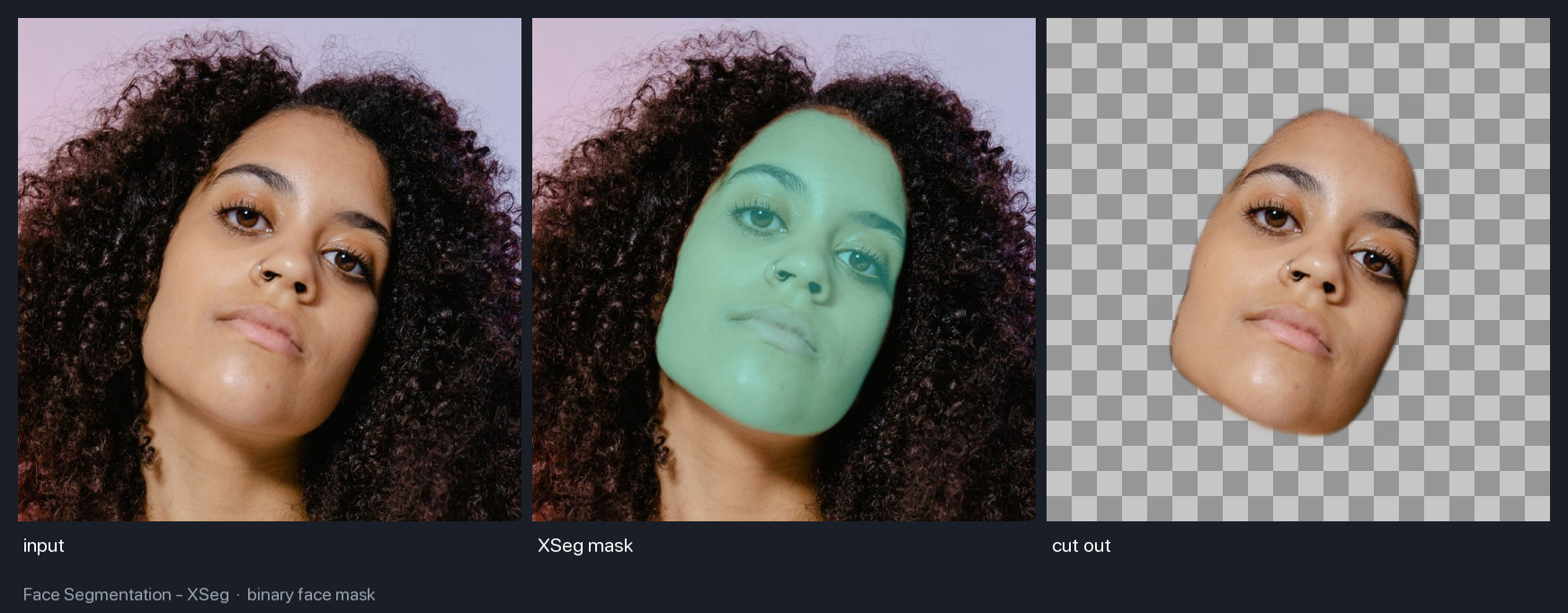
The cut-out panel shows the part people miss. XSeg masks the face, not the head: it stops at the hairline and leaves every curl behind, which is why its coverage numbers look small later on. Hair is a BiSeNet class, not an XSeg one.
| Model | On disk | Returns | Needs | Per face |
|---|---|---|---|---|
| BiSeNet ResNet-18 | 51 MB | 19 class IDs | a face crop | 66 ms |
| BiSeNet ResNet-34 | 89 MB | 19 class IDs | a face crop | 68 ms |
| XSeg | 67 MB | one soft mask | 5 landmarks | 49 ms |
Timings are per face on a laptop CPU, ONNX Runtime 1.24.4 on an M4 Pro, with RetinaFace supplying the boxes and landmarks. XSeg comes out fastest despite reading the full 2700 by 1800 frame, because the alignment step scales the face to 256 by 256 first. BiSeNet works at a larger input, and the backbone barely matters to the clock.
Which of the 19 classes actually turn up
The class table runs from background and skin through to necklace, cloth and hat. On a real portrait you never see all of them.
On the demo face, BiSeNet found 14: background, skin, hair, neck, cloth, nose, both ears, both eyebrows, both eyes, and the upper and lower lip. Skin and background take about 30 percent of the frame each, hair takes 15, and the eyes are the smallest thing it labels at roughly a fifth of a percent apiece.
Two classes are worth knowing before you go looking. Mouth, class 11, appeared on none of the three faces, because all three subjects have their mouths closed and class 11 covers the opening between the lips rather than the lips themselves. And on the scarf portrait, hat took the majority of the head at 55 percent of the crop against hair’s 0.6. The model has one class for head coverings and it used it correctly.
How small a face can get before it falls apart
Parsing is trained on CelebAMask-HQ, which is nothing but face-centred crops, so the usual advice is that a face must fill the frame or the small parts stop resolving. I wanted the number instead, so I shrank one crop step by step, asking each time which of the eight fine classes survived: both eyebrows, both eyes, nose, mouth, and both lips.
It holds up far longer than I expected. Seven of the eight were still there at a 48 pixel crop, which is a thumbnail. The collapse comes at 32 pixels, where the right eye and right eyebrow disappear and the face keeps only its left-side counterparts.
So the rule is looser than the folklore: at 50 pixels of box width BiSeNet still finds the eyes. Below that it drops one side of the face before it drops the middle, which is a strange thing to debug if you are not expecting it.
The bigger backbone is not the safer one
ResNet-34 costs 38 MB more than ResNet-18 and 2 ms more per face, which sounds like a fair trade for a bit more accuracy. On the easy portrait the two are hard to tell apart: both find the same 14 classes and their pixel shares agree to within a few tenths of a percent.
On the two harder frames the bigger model is the one that fails. On a portrait with a lot of hair, ResNet-18 found 11 classes and ResNet-34 found 10, losing the right eye outright and reducing the right eyebrow to a single pixel in a thousand. On the scarf portrait, ResNet-18 read the scarf as 55 percent of the crop while ResNet-34 read it as 44 and let the background take the difference.
Three faces is not a benchmark, and I would not claim ResNet-34 is worse in general. It does mean the extra 38 MB buys nothing you can count on here, and that the default is the smaller model for a reason.
XSeg’s soft mask is barely soft
XSeg returns values between 0 and 1, which reads as an invitation to feather the edge wherever you like. In practice the mask is almost entirely committed: across the three faces, the share of pixels sitting between 0.05 and 0.95 never reached one percent.
The mask covered 11 percent of the frame on that portrait and 4 percent on the one with more hair. The third face is the interesting one. It is wrapped in a patterned scarf that covers the head and everything below the eyes, and XSeg masked 1.8 percent of the frame: the exposed strip, and nothing else.
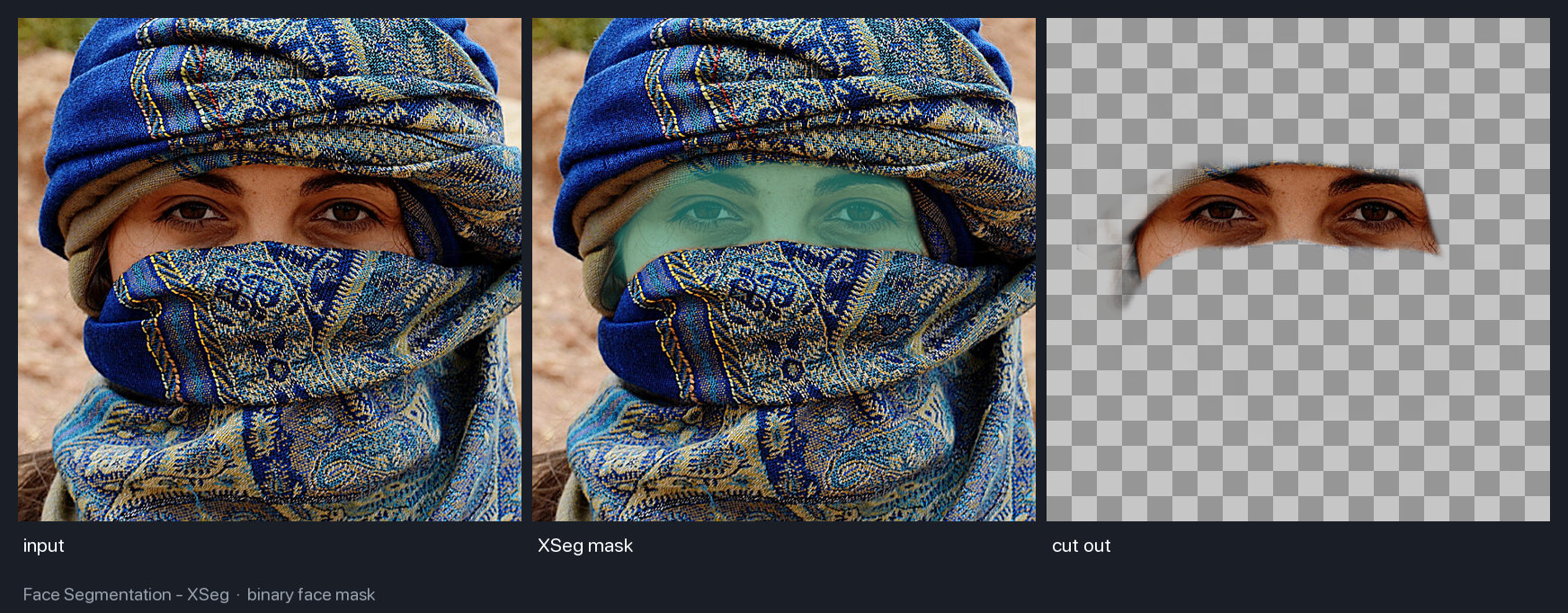
That is the model doing its job, not getting lucky. XSeg comes out of a face-swapping tool, where a mask spilling onto whatever is in front of the face ruins the composite, so it masks visible skin and stops. The demo notes record 8.6 percent coverage for this frame where I measure 1.8. I could not work out why, so take the shape of the result rather than either number.
Treat it as a hard edge, then. If you want a genuinely feathered matte, XSeg(blur_sigma=...) will smooth it on the way out.
Using them
Both parsers follow the same shape as the rest of the library, so the difference shows up in the call signature.
import cv2
from uniface import RetinaFace
from uniface.parsing import BiSeNet, XSeg

image = cv2.imread("portrait.jpg")
face = RetinaFace().detect(image)[0]

# BiSeNet: hand it a crop, get labelled pixels back.
x1, y1, x2, y2 = map(int, face.bbox[:4])
classes = BiSeNet().parse(image[y1:y2, x1:x2])

# XSeg: hand it the whole frame plus landmarks, get one mask back.
mask = XSeg().parse(image, landmarks=face.landmarks)
The snippet skips one thing: detectors return tight boxes and parsing wants the whole head. tools/parse.py widens the box by 20 percent on the sides and bottom and 40 percent on top, which keeps hair and ears in frame. Every number here used that expansion.
What you do next follows from the return types. A BiSeNet region is one comparison, and an XSeg mask is already an alpha channel.
# BiSeNet: every pixel holds a class number, so a region is a comparison.
hair = classes == 17
lips = (classes == 12) | (classes == 13)

# XSeg: values run 0 to 1, so the mask doubles as an alpha channel.
cutout = (image * mask[:, :, None]).astype("uint8")
| Notebook | Colab | Kaggle |
|---|---|---|
| Face parsing with BiSeNet |  |
 |
| Face segmentation with XSeg | |
|
Where each one falls short
- BiSeNet drops one side of the face first. Below roughly 40 pixels of crop width the right eye and eyebrow go while the left ones survive, so a half-parsed face is a size problem rather than a lighting one.
- XSeg is only as good as the landmarks. Alignment happens before inference, so a bad five-point estimate rotates the face and the mask goes with it. BlazeFace cannot feed it at all, because its keypoints mark the centre of the mouth rather than the corners.
- BiSeNet has no idea what occlusion is. The scarf portrait works because CelebAMask-HQ happens to have a hat class that fits, not because the model reasons about what is covering what, and a hand across the face has no class to land in. XSeg is the one to reach for when something might be in the way.
- Both outputs are per pixel with no notion of an instance. On a group photo you parse each face separately, which is why both sit downstream of a detector rather than replacing one.
FAQ
Which one should I start with?
If you need to name a region, use BiSeNet. If you only need the face separated from everything else, use XSeg. The giveaway is whether your next line of code asks a question about a specific part of the face.
Do I need a face detector for both?
Yes, but for different reasons. BiSeNet needs a box so it can be handed a face-shaped crop. XSeg needs the five landmark points, because it aligns the face before it looks at it, so a detector that returns no landmarks cannot feed it.
Is ResNet-34 worth the extra 38 MB over ResNet-18?
Not on this evidence. The two agreed closely on an easy portrait, and on the two harder frames ResNet-34 was the one that dropped regions, losing an eye on one image and reading less of the scarf on the other. Start with ResNet-18.
Why does the mouth class never appear?
All three subjects have their mouths closed. Class 11 covers the opening between the lips, so with a closed mouth the upper lip and lower lip classes carry the whole region and class 11 has nothing to label.
Related
- Face Parsing with BiSeNet and ResNet Backbones — the model itself, its training data, and the PyTorch side of the repo.
- UniFace: A Unified Face Analysis Library for Python — the library both parsers ship in, alongside matting and the detectors that feed them.
- RetinaFace: Single-Stage Face Detection in PyTorch — the detector that supplied every box and landmark above.