MobileGaze: Lightweight Gaze Estimation with MobileOne
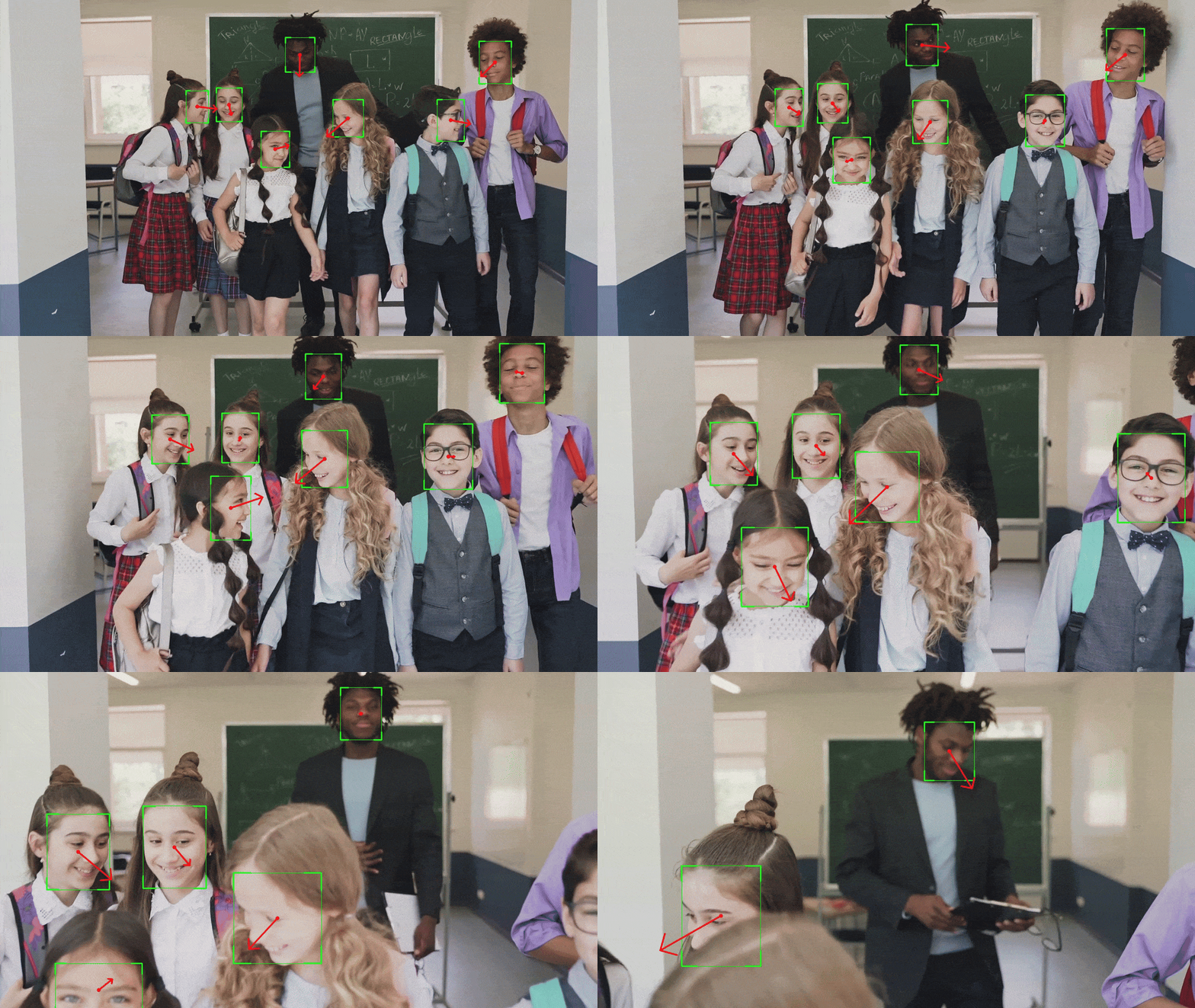
MobileGaze estimates gaze direction from a detected face. It builds on L2CS-Net, adds more mobile-friendly backbones, and provides PyTorch and ONNX weights for inference. The implementation is available at github.com/yakhyo/gaze-estimation.
Key takeaways
- MobileGaze predicts gaze as pitch and yaw from a cropped face, trained on Gaze360.
- ResNet-34 has the best reported accuracy at 11.33° MAE; MobileOne S0 stays close at 12.58° while being only 4.8 MB.
- Every published model ships with both PyTorch and ONNX weights, so you can train in one format and deploy in the other.
The inference pipeline first detects the face, then predicts gaze direction from the crop. In this repository, detection is handled through UniFace.
Model Families
The repository includes three backbone families:
| Backbone | Role |
|---|---|
| ResNet-18 / 34 / 50 | stronger accuracy, larger models |
| MobileNet V2 | compact mobile-oriented baseline |
| MobileOne S0 | very small mobile model with competitive reported error |
The README also lists MobileOne S1-S4 as trainable architectures, but pretrained weights are not published for those variants.
Training Data
The released models are trained on Gaze360. The repository also documents dataset structure for MPIIFaceGaze, but the published pretrained results are Gaze360-based.
Gaze estimation is reported with MAE in degrees. Lower values mean the predicted gaze direction is closer to the annotation.
Reported Results
ResNet-34 gives the lowest reported error, while MobileOne S0 is the strongest accuracy-per-megabyte option in the table.
| Model | Size | Epochs | MAE |
|---|---|---|---|
| ResNet-18 | 43 MB | 200 | 12.84 |
| ResNet-34 | 81.6 MB | 200 | 11.33 |
| ResNet-50 | 91.3 MB | 200 | 11.34 |
| MobileNet V2 | 9.59 MB | 200 | 13.07 |
| MobileOne S0 | 4.8 MB | 200 | 12.58 |
ResNet-34 and ResNet-50 have the best reported MAE in the table. MobileOne S0 is much smaller and stays close to the ResNet-18 result, which makes it useful for real-time or lower-resource settings.
What the Pipeline Produces
The model predicts gaze direction as pitch and yaw, and a live demo can draw those angles back onto the frame as a gaze ray.
The full pipeline is:
- Detect the face.
- Crop and preprocess the face region.
- Predict gaze pitch and yaw.
- Draw or consume the gaze direction in the application.
This structure is useful for attention tracking, human-computer interaction, driver monitoring, and accessibility prototypes.
PyTorch and ONNX
The repository provides both PyTorch and ONNX weights for the published models:
| Model | PyTorch | ONNX |
|---|---|---|
| ResNet-18 | yes | yes |
| ResNet-34 | yes | yes |
| ResNet-50 | yes | yes |
| MobileNet V2 | yes | yes |
| MobileOne S0 | yes | yes |
Use PyTorch while training or changing the model, and ONNX when the target application only needs inference.
FAQ
Which backbone should I choose?
If accuracy is the priority, ResNet-34 has the lowest reported error at 11.33° MAE. If size and speed matter more, MobileOne S0 stays close at 12.58° MAE while being only 4.8 MB, which makes it the better fit for real-time or edge use.
What dataset are the released models trained on?
The published weights are trained on Gaze360. The repository also documents dataset structure for MPIIFaceGaze, but the released pretrained results are Gaze360-based.
Do I need a separate face detector?
Yes. MobileGaze predicts gaze from a cropped face, so the pipeline detects the face first, then estimates gaze on the crop. In the repository, detection is handled through UniFace.
When should I use the ONNX weights instead of PyTorch?
Use PyTorch when you are training or modifying the model, and ONNX when the target application only needs inference without a full PyTorch runtime.
Related
- Real-Time Head Pose Estimation with MobileNet and ResNet — the same detect-then-estimate pattern, applied to head orientation instead of gaze.
- UniFace: A Unified Face Analysis Library for Python — the library that bundles this gaze model together with detection, recognition, and parsing.